

Roar Assistant with AI Enriched Search (BETA)
Liongard’s Roar Assistant with AI Enriched Search (BETA Release) allows users to interact with Liongard data through simple, natural language, making it easy to retrieve enriched search results or get answers to straightforward questions about systems, asset inventory records, and environments. It also supports conversational queries. After your initial query, you can then ask follow-up questions in the same conversation without starting over.
Feature Highlights
-
Natural Language: Enter your search term or ask a question as if you were speaking to a colleague—even in your native language.
-
Multilingual: The AI understands and processes queries in any language.
-
Comprehensive Coverage: Access data across all inspected Assets, Systems, and Environments.
-
Data Accuracy & Realism: The AI delivers a single, accurate response to each query.
-
Immediate Insights: Gain quick insights relevant to IT managers or security assessors, based on pre-trained data within the model.
How to access
Enable AI Usage for your Environments
-
Navigate to the Environments page; Admin > Environments.

-
Locate the environment(s) and toggle on the feature under the "AI USAGE" column.

-
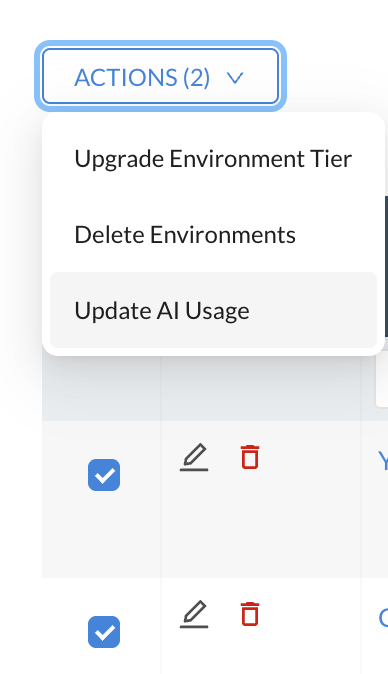
This can also be enabled in bulk by selecting all Environments and using the Action menu.
-
Using The Roar Assistant
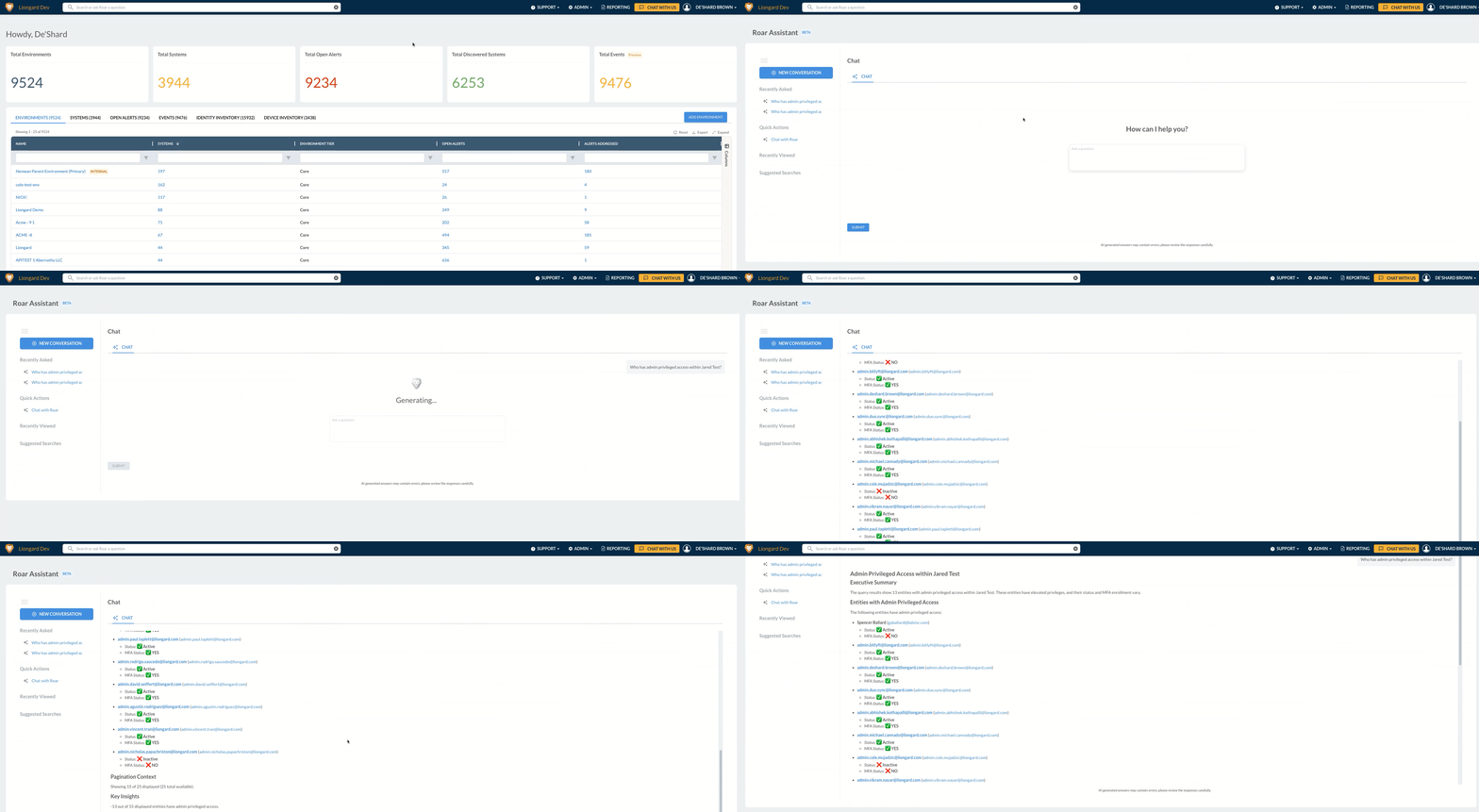
You can ask a question directly within the search bar and click Enter to perform a pre-search before switching over to the Chat tab. Your query will auto-populate the Chat tab.
The search bar will now display “Search or ask Roar a question.”
NOTE: AI USAGE MUST BE ENABLED IN ORDER FOR THE FEATURE TO RETURN DATA.

Permissions and AccessThis feature follows the existing Liongard User Permission Roles configured in the platform. The information you can view or retrieve is automatically limited to the environments and assets you have access to.
If you do not have permission to a specific environment, system, or data source, it will not appear in results or responses generated by this feature. This ensures that all activity and data visibility remain consistent with your organization’s configured access controls.
Roar Assistant Docked Panel Experience
The Roar Assistant Docked Panel gives you continuous access to Liongard's AI-powered assistant without interrupting your workflow. Unlike the standalone assistant page, the docked panel stays open as you navigate throughout Liongard, preserving your conversation, automatically applying page context, and providing flexible layouts that let you work the way you prefer.
Whether you're troubleshooting an alert, investigating an environment, or creating customer-ready documentation, the Docked Panel keeps your conversation available while you continue working in the application.
Prerequisites
Before using the Docked Panel, ensure the following requirements are met:
-
LiongardIQ Subscription
- An active LiongardIQ subscription is required.
- Includes 1,000 AI credits per billing cycle.
-
AI Enabled
- AI features must be enabled for the appropriate environments from the Admin panel.
-
Available AI Credits
- Each Roar Assistant interaction consumes AI credits from your tenant's available balance.
- Credit usage is the same as the existing Roar Assistant experience.
-
Desktop Browser
- The Docked Panel is designed for desktop browsers.
- Mobile support is planned for a future release.
-
Auto-Summarization (Optional)
- Automatic Environment and System summaries require the tenant-level Auto-Summarization setting to be enabled under Company Settings.
Open the Docked Panel
You can open the Roar Assistant from anywhere in Liongard.
Option 1: Global Navigation
Click Ask Roar from the global navigation bar.
Option 2: Keyboard Shortcut
Press:
⌘ / (macOS) or Ctrl / (Windows)
When the panel opens, it docks beside the navigation by default.
Automatic Context Detection
The Docked Panel automatically understands where you're working.
If you open the assistant while viewing:
- an Environment, or
- a System
the corresponding Environment and System filters are automatically populated.
This allows your first question to be scoped correctly without requiring any manual configuration.
You can modify or clear these filters at any time if you'd like to broaden your search.
Ask Your First Question
When the panel opens, Roar displays suggested starter prompts based on:
- your current page
- selected Environment
- selected System
Choose one of the suggested prompts or enter your own question.
Continue Working Without Losing Context
Unlike the standalone assistant, the Docked Panel remains open while you navigate throughout Liongard.
Your conversation is preserved as you move between:
- Environments
- Systems
- Alerts
- Dashboards
- Reports
- Other application pages
While the panel is docked:
- the left navigation automatically collapses to maximize workspace
- the navigation reappears when you hover over it
Open Links Without Leaving the Conversation
When Roar returns links to Liongard resources, selecting a link opens the destination in the main application area instead of inside the assistant.
This allows you to:
- review recommendations
- investigate systems
- make configuration changes
without interrupting your conversation.
Customize the Panel Layout
Choose the layout that best fits your workflow.
Available layouts include:

- Dock Left
- Dock Right
- Floating Window
- Full Screen
You can also switch between:
- Chat
- History
- Search
without resetting your conversation.
Work with Multiple Conversations
The Docked Panel supports multiple conversation threads.
Each conversation maintains its own:
- context
- history
- selected resources
This allows you to investigate multiple customers or environments simultaneously without mixing conversation context.
Queue Follow-Up Questions
You don't have to wait for one response to finish before asking another question.
While Roar is generating a response, you can submit additional prompts.
Queued prompts are processed automatically in the order they were submitted.
Explore Multiple Systems in Full Screen
When expanded to Full Screen, the Docked Panel includes the Environment & System Explorer.
Use the explorer to:
- browse environments
- locate systems
- add multiple systems as context
- compare resources across environments in a single conversation
This is especially useful when investigating issues spanning multiple customers or locations.
Export Responses
You can export the most recent assistant response for documentation or reporting.
Supported export formats include:
- HTML
- CSV
- Markdown
- Microsoft Excel
- Microsoft Word
Exports can be shared internally or delivered directly to customers.
Choose Your AI Model
The Roar Assistant lets you choose which AI model handles your requests. Your company sets a default model, and when your admin allows it, you can override it with your own choice.
Select a Model
- In the chat input row, click the model picker to the left of the Send button. It shows Auto by default, or the short name of your selected model (for example, Sonnet 4.6).
- Review the AI usage meter at the top of the menu. It shows the percentage of your AI Insight Credits consumed, how many have been used, and a View Usage link.
- Select a model from the list. Each model displays its credit rate (for example, 1× or 4×).
Your selection is saved to your user profile, so it follows you across conversations, page reloads, devices, and logins.
Available Models
| Model | Provider | Credit Rate |
|---|---|---|
| Auto (Recommended) | — | Rate of the model that served the request |
| Claude Haiku 4.5 | Anthropic | 1× |
| Claude Opus 5.5 | Anthropic | 2× |
| Claude Opus 5 | Anthropic | 2× |
| Claude Sonnet 5 | Anthropic | 1× |
| Claude Sonnet 4.6 | Anthropic | 1× |
| GLM 5 | Z.ai | 1× |
| GPT-6.1 Sol | OpenAI | 4× |
| Grok 4.7 | xAI | 1× |
| Kimi K3 | Moonshot AI | 1× |
| Kimi K2.5 | Moonshot AI | 1× |
Why Don't I See Every Model?The model picker lists only models that can run within your instance's region and that your company's allowed AI model providers include. Some models, such as GPT-6.1 Sol and Grok 4.7, are available on US-region instances only. A model that isn't available to you is hidden rather than greyed out.
Understand Credit Rates
Each model has a fixed credit rate per request, not per token, so your usage stays predictable.
- A 1× model uses 1 AI Insight Credit per request.
- A 2× model uses 2 credits per request.
- A 4× model uses 4 credits per request.
For example, one request on GPT-6.1 Sol counts as 4 credits against your monthly allocation, while the same request on Claude Sonnet 5 counts as 1.
Auto bills at the rate of whichever model served the request. Models with a rate above 1× are never used by Auto, so using one is always an explicit choice by you or your admin.
Billing Acknowledgement
The first time you select a model other than Auto, a [Model name] billing acknowledgement window appears. It shows the model's credit rate and reminds you that overage charges may apply if Pay-as-you-Go Billing is enabled.
- Click I understand — use [model name] to switch to the model.
- Click Cancel to keep your previous model.
You won't be asked again for that model unless its credit rate changes.
Higher-Rate Models Use Credits FasterClaude Opus 5.5 and Claude Opus 5 are 2× models, and GPT-6.1 Sol is a 4× model. If Pay-as-you-Go is set to Unlimited, heavy use of these models increases overage charges faster.
Manage AI Model Settings (Admins)
Liongard Admins manage AI model settings in Company Settings > AI INSIGHTS, below Pay-as-you-Go Billing. Users without access to Company Settings can't view or change these controls.
Where to Find These SettingsAI model settings are in Company Settings > AI INSIGHTS, not in Admin > AI Preferences. Admin > AI Preferences manages MCP access tokens only.
-
Default AI Model
Sets the model for everyone in your company who hasn't chosen their own. The list includes Auto plus the available models from your allowed providers. Your selection saves automatically and displays an AI MODEL SETTINGS UPDATED confirmation. -
Allow User Overrides
On by default. When on, users can choose their own model in chat. When off, the company default applies to everyone, and the chat model picker is disabled with a Set by your company admin tooltip. -
Allowed AI Model Providers
Controls which AI model providers your tenant can use. All eight providers are selected by default: Anthropic, OpenAI, Amazon, Meta, xAI, Moonshot AI, Z.ai, and MiniMax.
Choosing a Higher-Rate DefaultIf you set a 2× or 4× model as the Default AI Model, every user who hasn't chosen their own model consumes credits at that rate.
Allowed AI Model Providers
Use Allowed AI Model Providers when your own policies, or your clients' requirements, rule out specific AI vendors. The control shows how many providers are selected (for example, 8 of 8 selected).
-
Hidden Models
Models from cleared providers are removed from the Default AI Model list and the chat model picker. Auto routes only to allowed providers. -
Applies to All AI Features
The setting is enforced wherever Liongard routes AI requests, including Roar Assistant chat, natural-language queries through the Liongard MCP (liongard_query), and background AI features such as summaries. Liongard never falls back to a cleared provider. -
Default and User Fallback
If you clear the provider of the current Default AI Model, the default resets to Auto and a notice is displayed. Users whose saved model belongs to a cleared provider use the company default instead. -
At Least One Provider Required
The setting can't be saved with every provider cleared. If none of the remaining providers has a chat model available, chat displays a message that no AI model is available under your company's allowed providers. -
Audit Logging
Every change is recorded in the audit log, including who made the change, when, and the before and after values.
Tip: Allowed AI Model Providers applies to the whole company and works at the provider level, not per model or per user. To limit everyone to one specific model, set the Default AI Model and turn off Allow User Overrides.
Best Practices
- Start the assistant from the Environment or System you're investigating to automatically scope your conversation.
- Use multiple conversation threads when working across several customers or investigations.
- Switch to Full Screen when comparing systems across environments.
- Export responses to quickly create customer reports, documentation, or internal notes.
- Override the automatic filters whenever you need to broaden the assistant's scope.
- Leave the model picker on Auto unless you need a specific model. Most models use 1× credits per request.
- Switch to a more capable model, such as Claude Opus 5.5, for multi-step analysis or comparisons across many systems, and return to Auto for everyday questions.
Tip: When you open the Docked Panel from an Environment or System page, Roar automatically applies the appropriate filters for you. This means your first question is already scoped to the resources you're viewing, helping you get relevant answers faster.
Gen AI - Chat & Enriched Search Feature FAQs
Question 1: What is the Gen AI Chat & Enriched Search feature?
Answer: GenAI Chat & Enriched Search use Generative AI to deliver fast, accurate, and easy-to-understand insights from your Liongard data.
- Enriched Search (Public Beta):
Allows you to ask one-shot questions through Chat with Roar. The AI returns concise summaries and answers based on the systems and environments Liongard is monitoring. - GenAI Chat (Coming Soon):
A bidirectional conversational assistant designed for more complex, multi-step interactions.
These features will enable you to quickly understand important information about assets, systems, inspectors, agent health, and more, without having to sift through raw data.
Question 2: What data is used to create the responses and can it be scoped by Environment?
Answer: The AI uses only the data Liongard already collects for the systems you manage, and only from entities the user has permission to access.
- You can scope your AI prompts by including:
- Environment name
- System name
- Asset identifier
Providing this context improves accuracy and reduces processing time. If a prompt references data from an Environment where AI Usage is disabled, the response will return the standard access error:
“We are unable to process data for Environments that do not have AI Usage enabled. Please ask your administrator to ensure AI Usage is enabled under Environment settings. If this issue persists, try again later or reach out to Liongard Support for assistance.”
Question 3: How is my data protected when using this feature?
Answer: Your data security is paramount.
- All data sent to generate the summary is encrypted during transit (using TLS 1.2+).
- The AI processing is done via AWS Bedrock, a secure platform that is HIPAA Eligible and FedRAMP High authorized.
- Importantly, your data is NOT stored by the AI model provider and is NOT used to train any AI models.
Q4: Who can see what AI responses?
Answer: AI responses follow your existing Liongard permission model:
- AI Usage must be enabled at the Environment level.
- A user must already have permission to view the underlying asset or Environment.
- If they can see the data in Liongard, they can generate and view the AI response.
Q5: Can I opt-out and control what data the AI has access to?
Answer: Yes. AI access is controlled per Environment.
- Administrators can enable or disable AI features by toggling AI Usage in Environment Settings.
- If AI Usage is disabled, the AI will not process or return data for that Environment.
- More granular user- and environment-level controls will be released in upcoming updates.
Q6: Does using this feature send my data outside of Liongard's secure environment?
Answer: To generate the responses, relevant data for the specific asset is securely sent to AWS Bedrock, our trusted AI service provider. This communication is fully encrypted. AWS Bedrock processes the data solely to generate the summary and does not retain it. The processing occurs within the same secure AWS infrastructure regions used by Liongard.
Q7: Which AI models are used?
Answer: Liongard uses leading, commercially available AI models. By default, Auto routes each request to the appropriate model. You can also choose a specific model from the model picker in the chat input row. See Choose Your AI Model for the full list of models and credit rates.
Q8: Which model should I use?
Answer: Leave the model picker on Auto unless you have a reason not to. Auto uses only 1× models, so it never uses Claude Opus 5.5, Claude Opus 5 (2×), or GPT-6.1 Sol (4×). Those models are used only when you or your admin choose them.
Q9: Why should I use a different model, and what are the results?
Answer: Auto is built for everyday questions and is the right default. Switch to a more capable model when a question needs more depth, such as multi-step analysis, comparing many systems or environments, or recommendations that take more reasoning. Models like Claude Opus 5.5, Claude Opus 5, and GPT-6.1 Sol work through a question in more depth, so answers tend to be more thorough and detailed than what you get from Auto.
The trade-off is cost: these models bill at 2× or 4× per request, and Auto never uses them, so choosing one is the only way to get them. For simple lookups or quick questions, you'll see little difference, so stay on Auto or a 1× model and save your AI Insight Credits.
Q10: Why do some models cost more?
Answer: Larger, more capable models use more computing power to answer each request. Rather than billing by how much each answer uses, Liongard assigns every model a fixed rate per request, so your usage stays predictable. Most models are 1×. A 2× model counts as two requests against your AI Insight Credits, and a 4× model counts as four. The rate is shown next to each model in the picker, and you'll see it again before you use a model for the first time.
Q11: Why did a billing acknowledgement pop up?
Answer: It appears the first time you select a specific model other than Auto, so you see its credit rate before it's used. You won't be asked again for that model unless its rate changes.
Q12: Why is my model picker greyed out with the message "Set by your company admin"?
Answer: Your Liongard Admin has turned off Allow User Overrides, so everyone uses the company's default AI model. Ask your Liongard Admin to turn on overrides if you need to choose your own model.
Q13: Why can't I see a specific model?
Answer: The model picker lists only models that can run within your instance's region and that your company's allowed AI model providers include.
Q14: Can my admin stop us from using a specific AI provider?
Answer: Yes. Liongard Admins can clear a provider under Allowed AI Model Providers in Company Settings > AI INSIGHTS. Liongard then won't send requests to that provider's models. The setting applies to the whole company and works at the provider level, not per model.
Q15: Does my model choice follow me between devices?
Answer: Yes. Your selection is saved to your user profile, not to a single browser or conversation.
Q16: Where do admins change the default model?
Answer: In Company Settings > AI INSIGHTS, not in Admin > AI Preferences.
Updated about 22 hours ago