

Release Notes Through 2025-12-11
Overview
Device Status Monitoring / New Agent Version
The Network Discovery inspector and agents have been updated to provide device status feedback for agented devices (Microsoft, Mac, and Linux) and agentless devices (pingable devices). The devices are categorized as follows: Green for active and responding, Red for inactive and unresponsive, Yellow for experiencing issues, and Grey for status undetermined. This feature is seen in the Asset Inventory (Devices) page in Liongard. The status column has been updated to provide granular visibility into a device’s current operational state after it has been transitioned from Discovery to Inventory.
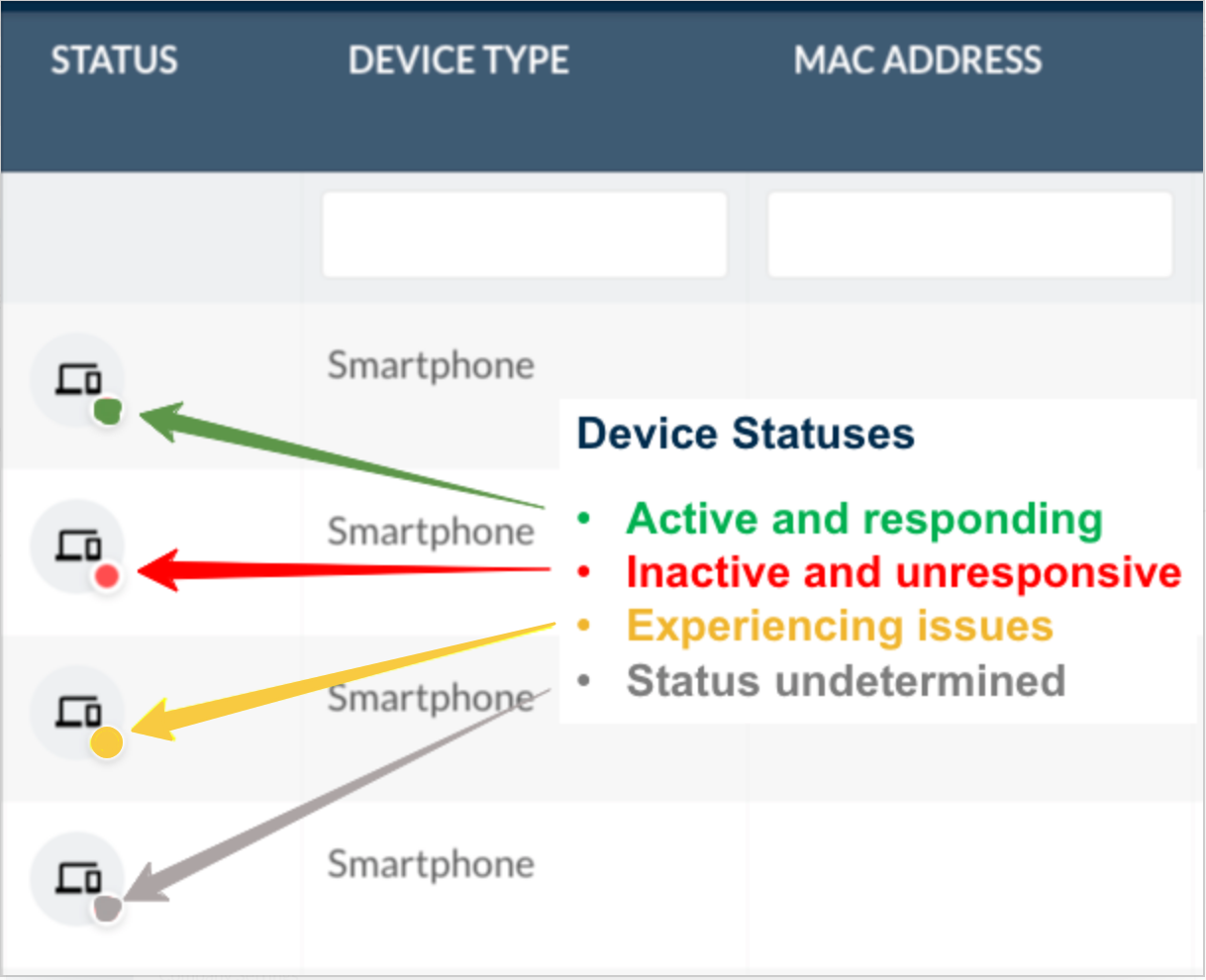
New Agent Version 5.1.2This feature will be released in phases and will requires the new 5.1.2 agent and the Network Discovery version 2.0 Inspector
Liongard Academy Mobile App
Introducing the Liongard Academy Mobile App, your on-the-go hub for sharpening your Liongard knowledge and mastering best practices from anywhere. We are bringing the Academy’s learning experience directly to your mobile device—making it easier than ever to access training, track your progress, and stay up to date with new content.
With the mobile app, you can:
- Access courses, modules, and certifications anytime, anywhere
- Pick up where you left off across devices
- Enjoy a streamlined, mobile-optimized learning experience
Power Users
Please note that the mobile app does not support Admin (Power User) capabilities. It only supports learner view.
Please refer to our documentation for information on how to access it.
Minor Updates and Bug Fixes
Platform Minor Updates and Bug Fixes
- Fixed an issue causing read-only users from being able to access Environment Agent Installs.
- Fixes issue where users were unable to delete Archived inspectors in bulk.
- Fixed the issue where "Disabled" values were incorrectly included in filtered results for "Agent Issue". Filtering for "Disabled" values is now enabled on the Admin > Discoveries page.
- Fixed an issue where exporting Environment Groups data from the Access Management page resulted in a downloaded file missing the expected environment group records.
- Added a Link to an inspector's agent from the System Details screen.
- Fixed an issue where, when using the Environment Agent Installed feature, an API key was created under the Account Management page instead of an agent install key.
- Updated the Onboarding Checklist to steer users to the correct locations in the application.
- Added feedback, copy, and retry functionality to the AI chat.
- Resolved an issue with Real-Time Monitoring (RTM) in the Microsoft 365 inspector where duplicate or false-positive events were repeatedly triggered in the “New User Created” and “Privileged User Created” categories.
- Resolved an issue where 'Scheduled' or 'Scheduled (Inactive)' reports incorrectly displayed the inspection date as 'Latest Inspection' and included outdated data. Also, improved the status display for scheduled reports with deleted schedules, so they now appear as 'Scheduled (Inactive)' for better clarity.
- Resolved an issue where manual Reports using the “Latest” inspection range displayed outdated data when viewed.
Integration and Inspector Minor Updates and Bug Fixes
- Actionable Alerts
- Resolved an issue that caused alert flapping related to Windows workstation data collection.
- Active Directory
- Resolved an issue with the Active Directory Inspector where users were seen to be missing from the MembersStr but found in MembersList datapoints.
- Asset Inventory
- Fixed an issue causing Asset Details from the asset inventory to fail to load.
- Device Category is now a column in the asset inventory.
- Asset Inventory will now surface License Expiration to devices under the Inventory tab.
- Resolved an issue in Asset Inventory where the Liongard Billable column was showing as empty.
- Resolved an issue in the Asset Inventory with processing data from the N-Able inspector, causing errors when attempting to process certain devices.
- Improved the Asset Inventory by ingesting KnowBe4 user accounts into the inventory, matching with existing identities or creating new identities as needed.
- CrowdStrike
- Resolved an issue with the CrowdStrike inspector failing with status code 404 due to using a deprecated API.
- Cyber Risk Dashboard
- Updated look and feel of the Privileged Users with MFA Registered drill-down table.
- Updated look and feel of the Privileged Users Registered drill-down table.
- Updated look and feel of the Total Users MFA Enforcement Status drill-down table.
- Updated look and feel of the Total Users with Registered drill-down table.
- Updated look and feel of the Total Users drill-down table.
- Dark Web Monitoring
- Added a search and filter option in the Dark Web Monitoring, Breach Details data view for the Data Classes column.
- Internet Domain/DNS
- Resolved an issue with the Internet Domain/DNS inspector returning inconsistent data print details for DNS, MX, and NS record values, causing false positive alerts.
- Resolved an issue with the Internet Domain/DNS inspector not properly detecting DKIM configurations on a reported domain.
- Resolved an issue with the Domain inspector where false positive alerts occurred for DMARC, SPF, NS, and MX records due to parsing on DoH APIs.
- Resolved an issue with the Domain inspector where the SystemInfo.Registrar intermittently returned empty values, causing false “changed” alerts.
- Resolved an issue with false positive alerting in the Internet Domain/DNS inspector caused by MX records occasionally failing to return for domains fully.
- Resolved an issue in the Domain inspector where data fields were returning blank due to language constraints.
- Resolved an issue with the Internet Domain/DNS inspector giving false positive alerts for the List of Subdomains Changed.
- Resolved an intermittent issue with the Internet Domain/DNS Inspector that prevented website data from being retrieved.
- Resolved an issue with the Internet Domain/DNS inspector where it displayed the MX record name instead of the full MX exchange value.
- Resolved an issue with the Internet Domain/DNS inspector, where it reported failures in the SPF Health check for domains.
- Resolved an issue in the Domain inspector where it was failing to retrieve WHOIS information for non-standard TLDs.
- Microsoft 365
- Resolved an issue with the Microsoft 365 inspector where not all fields for Device Configuration profiles were properly returned in the dataprint.
- Resolved an issue with the Microsoft 365 inspector where larger environments were experiencing Microsoft Graph errors on inspection.
- Resolved an issue with the Microsoft 365 inspector that prevented app roles from being retrieved for Service Principals. Also addressed a problem where Global Administrator and other role memberships were incomplete due to missing Service Principals in the members list.
- SentinelOne
- Resolved an issue with the SentinelOne inspector where it was not retrieving complete application CVE data.
- SonicWall
- Resolved an issue where the SonicWall inspector was found to be failing in v6.x.x environments, causing the inspection to get stuck in a 'Scheduled' status and timing out.
- Resolved an issue with the SonicWall inspector where it was failing due to a deserialization error.
- TLS/SSL
- Resolved an issue with the TLS/SSL inspector where non-existent or 'phantom' subdomains were incorrectly treated as valid, resulting in inspectors being created for them.
- Ubiquiti Unifi
- Resolved an issue with the Ubiquiti UniFi Inspector not displaying WAN IP information in the Network Configuration table view.
- Windows Agent
- Fixed an issue with the update agent logic, which was replacing names for the same machine IDs.
- Windows Inspectors
- Resolved an issue with the Windows Workstation and Server inspector where it was reporting the incorrect warranty start dates.
- Windows Server
- Removed Windows 11 Compatibility datapoints from the Windows Server Inspector.
- Fixed an issue with Antivirus data not showing for some Windows Inspectors.
- Improved reliability when detecting user ID changes in the Windows Server Inspector.
- Resolved an issue with the Windows Server inspector where it failed to retrieve certain values due to null property errors.
- Windows Workstation
- Fixed a Visual Insights metric causing inconsistent hostname results for Windows Workstations.
- Windows 11 devices will now show as "Already Installed" under the Windows 11 Compatibility data point.
- Resolved an issue with the Windows Workstation inspector that prevented warranty data from being populated for Dell and Lenovo devices.
Metric Library
Have you been able to check out the Metric Library yet? Share custom Metrics and learn best practices from other Partners to get the most out of the platform. Access it in the Support drop-down menu in your instance.
Visit the Metric Library today!
Updated 10 months ago