

Release Notes Through 2026-4-8
Overview
New Feature: MCP Server Access
Liongard is excited to introduce MCP Server Access, a powerful new capability that enables you to securely connect to Liongard data for advanced automation, integrations, and AI-driven workflows. With MCP Server Access, you can programmatically query asset data, retrieve contextual insights, and interact with their environments using your preferred tools.
What’s New
-
Secure MCP Server Access for Partners. Connect tools like VS Code, n8n, or Claude Code to query assets, monitor environments, and support compliance and incident response workflows.
-
AI & Automation-Ready Data Access. Leverage natural language queries, contextual insights, and programmatic access to accelerate support, audits, and decision-making.
Why It Matters
MCP Server Access extends Liongard’s unified asset intelligence beyond the platform—giving you faster, more flexible ways to access, use, and build on your data.
For more details about this feature, please review our documentation (FAQs).
New Feature: Admin AI Preferences Panel (Subscription required)
The Admin AI Preferences Panel (Admin > AI) introduces a new self-service management experience for MCP access and AI integrations. This centralized console gives MSP admins full control over how Liongard’s AI capabilities are accessed, extended, and secured—without the need for support or manual provisioning.
In Phase 1, partners can create and manage MCP tokens for direct integrations, with additional feature-gated capabilities planned for future releases.
Feature Highlights
Shipping — Phase 1 (March 12, 2026):
- Self-Service MCP Token Management: Create, label, scope, and revoke MCP access tokens directly from the Admin panel—no support request required.
- Environment-Level Token Scoping: Restrict token access to specific environments or leave unscoped for full tenant-wide access.
- Environment Group Scoping: Scope tokens to environment groups for more flexible delegation.
- View-Once Security Model: Access Key Secrets are shown only once at creation and cannot be retrieved later, enforcing secure credential handling.
- Immediate Revocation: Revoke tokens instantly, with authentication stopping in under one minute.
- Expiration Date Support: Set optional expiration dates to enforce key rotation and improve security hygiene.
- Registry Tab (Coming Soon): Access an advanced view of registered resource types and MCP configuration state.
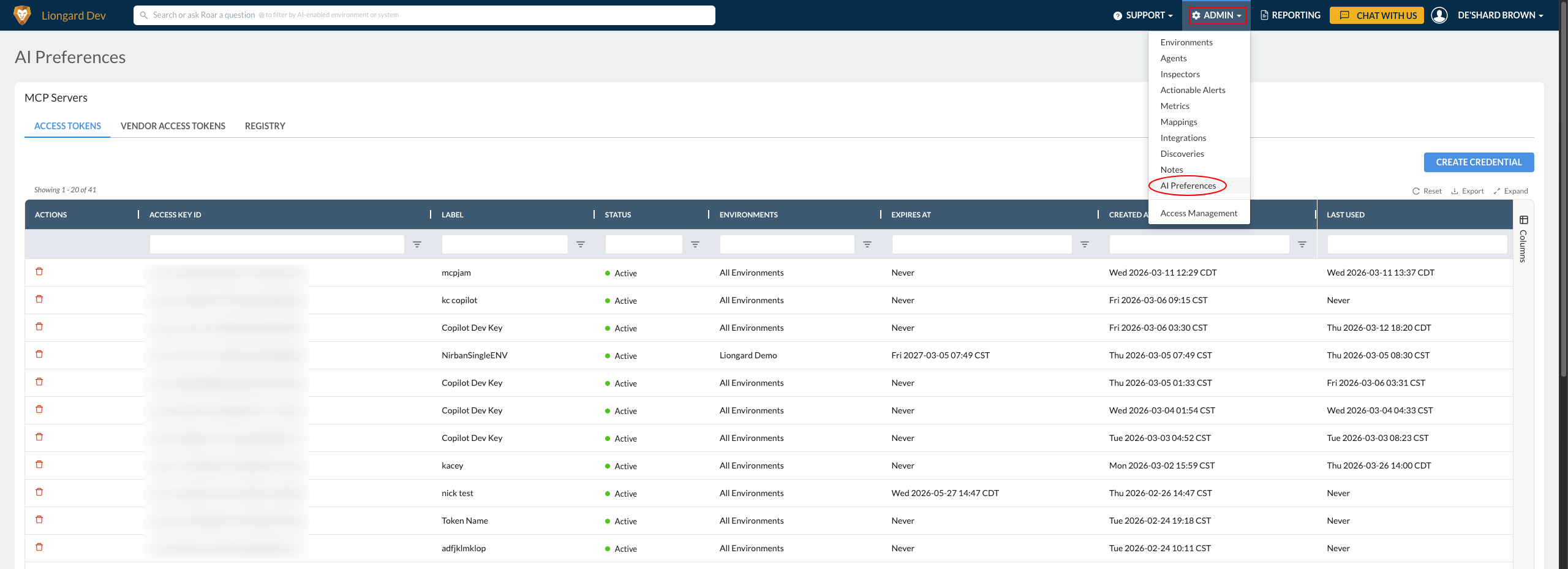
For more information about this feature, please review our documentation.
Enhancement: Inspector Table “Discovered By” Column
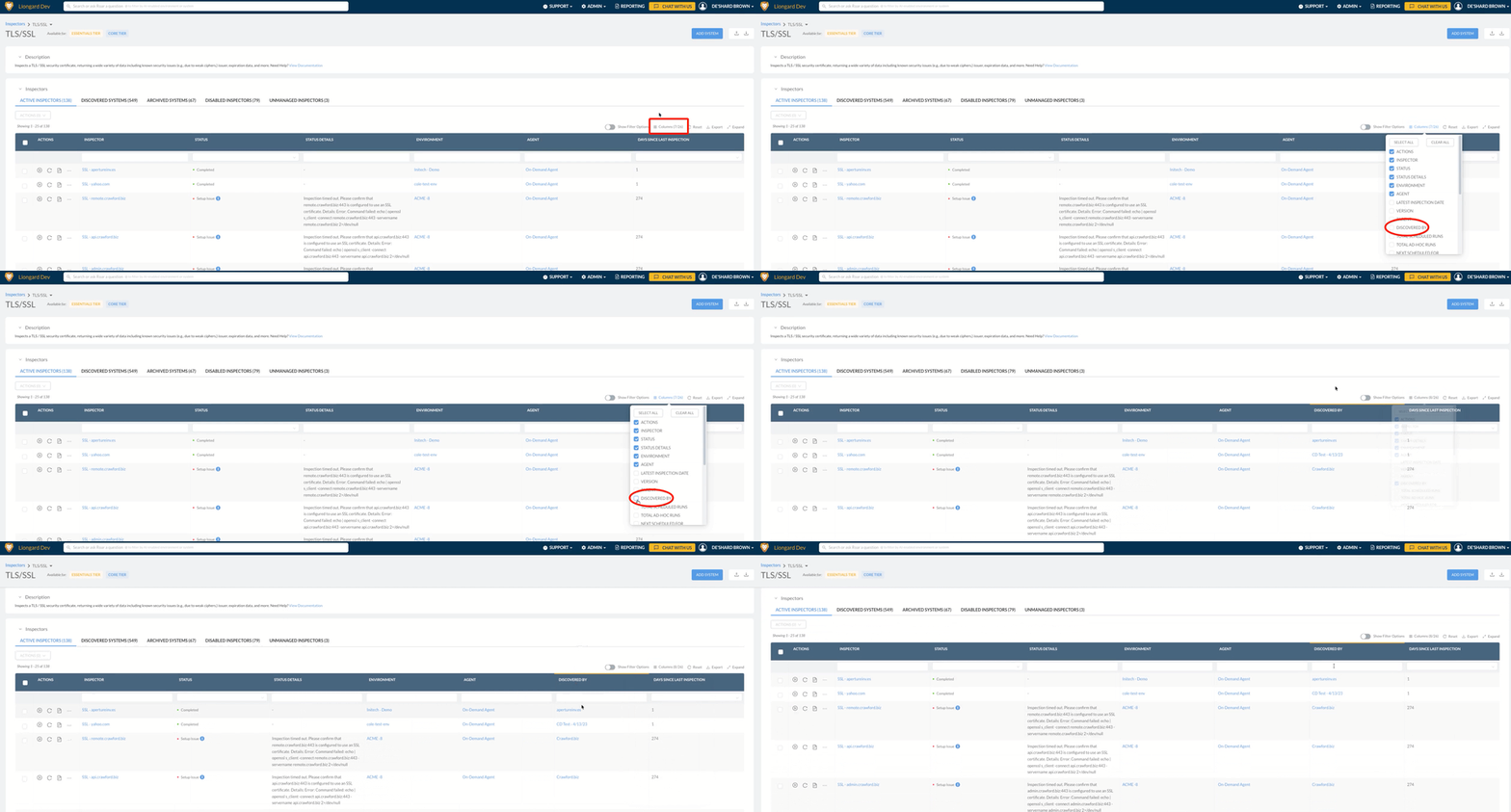
We’ve enhanced the Inspector table with a new, filterable “Discovered By” column, giving you greater visibility into how each inspector was identified.
This update makes it easier to understand discovery sources, filter inspectors by origin, and quickly identify how assets are being brought into your environment.
New: Autotask-Powered Visual Insights Pro Dashboards
You now have access to four new Autotask-powered dashboards in Visual Insights Pro, giving you near real-time visibility into your PSA ticketing environment directly within the Liongard platform.
Each dashboard is designed to support a specific operational need—helping you monitor overall service desk health, track technician performance, and analyze client demand—all in one place.
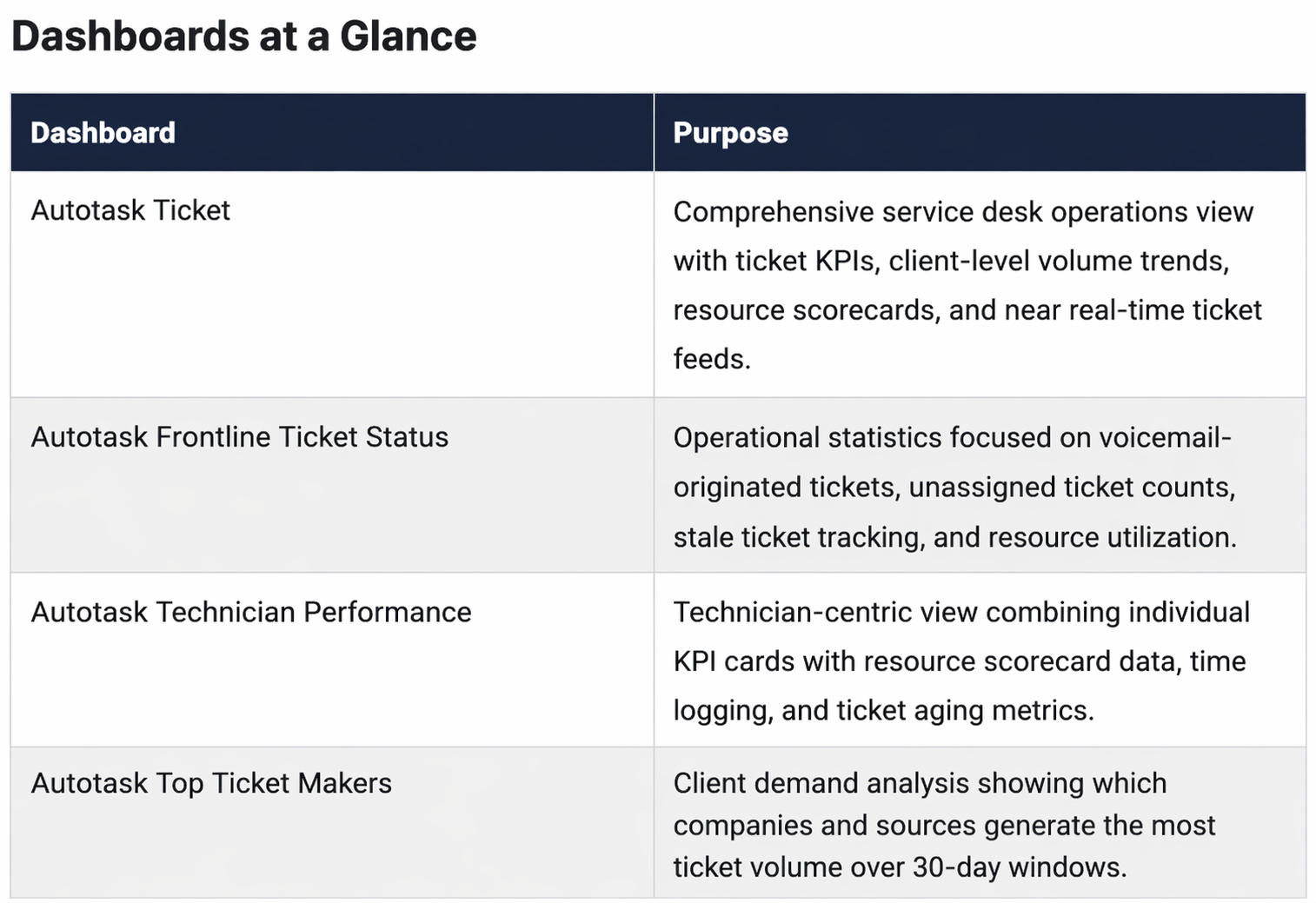
For more details about our new dashboards, please review our documentation.
Minor Updates and Bug Fixes
Platform and Gen AI Minor Updates and Bug Fixes
- Fixed an issue where unexpected selection was being toggled for unselected rows on the AgGrid Table.
- Fixed an issue where the DeviceProfile Query API was returning the same records on multiple paginated requests, because of empty/null values in hostname, while it was also sorting by hostname.
- Fixed an issue where pre-selected items were not reflected in the target assets list table.
- Fixed an issue where pre-selected items were not reflected in the target assets list table after data refresh.
- Fixed an issue where the table header "Select All" button did not match its intended behavior. It now selects all rows for static data and only the current page for dynamically paginated data.
- Fixed an issue where it was showing an unnecessary filter icon on a table with multiple filter options, where it only supports one.
- Enhanced the Create Asset Relation API to support bulk assignment of multiple target assets within a single request.
- Fixes an issue where the Environment Admin page crashes when navigating away from Environment Notes.
- Fixes an issue where clicking Manage Inspectors in the Environment Discovery Dashboard causes the page to break.
- Fixed bug to properly display tokens by type.
- Improved Roar Assistant experience by providing clickable follow-up questions and confirmation options.
- Improved Roar Assistant chat history with search capability.
- Improved Roar Assistant response accuracy of counts to Alerts, Changes, Discovery, and Events by status.
- Improved Roar Assistant conversation titles with concise, dynamic, and human-readable titles.
- Improved MCP and agent with the ability to retrieve from Liongard public documentation.
- Improved MCP experience to bypass the confirmation step when exact entity matches are present in the query.
- Fixed at-tagging display in UI for dark mode users.
- Added AI User role that limits access to all credit-consuming AI functionality.
- Improved RoarPath Commands by adding support for 'to_upper_case' on string objects.
- Enhanced the Company Info and Company Settings sections by adding an 'Endpoint Auto-Activation' toggle to automatically activate discovered endpoint inspectors with environmental exclusion options.
- Improved the Activity Log table by including events regarding Actionable Alerts and their Change Types that occurred.
- Enhanced Activity Logging to capture metric-related events, including change types and event descriptions.
- Enhanced Liongard Access Management logging to capture access and modification events for launchpoint configurations.
- Resolved an issue where an excessive column called 'Visible' was displaying in the Access Management, Users table.
- Enhanced the Open Alerts table with automatic column sizing that fits the available space, plus manual resizing and a reset option.
- Improved the Activity Log table by including events regarding Actionable Alerts and their Change Types that occurred.
Integration and Inspector Minor Updates and Bug Fixes
- Actionable Alerts
- Resolved an issue in Actionable Alerts for ConnectWise where the Destination dropdown showed duplicate board names.
- Active Directory
- Resolved an issue with the Active Directory inspector where the "System Details > DHCP > Active Leases" section was displaying null values for the IP Address field.
- Resolved an issue in the Active Directory inspector that caused false positive “Active Directory | Default Administrator Account Enabled” alerts when the Administrator account was, in fact, disabled in Active Directory.
- Asset Inventory
- Add Domain and Certificates to Asset Inventory.
- Added bulk update to Asset Inventory Domains and Certificates
- Fixed an issue where the column selector text was misaligned in the AgGrid table for asset selectors.
- Axcient x360
- Resolved an Axcient x360Recover inspector issue where Appliance Storage Details, Device Backup Job Warning, Health Status, and Vault Tunnel Down alerts generated false positives that reopened closed tickets.
- ConnectWise
- Resolved an issue where the ConnectWise integration displayed a 'Platform Failure' status on inspections when processing unmapped fields.
- Resolved a ConnectWise Manage inspector issue that prevented full Agreement record returns due to a row limit.
- Fixed an issue in the ConnectWise Manage inspector that caused incomplete records when returning large numbers of configurations.
- Cisco Meraki
- Resolved an issue in the Cisco Meraki inspector where the rule "Cisco Meraki Inspector | User Added/Removed/Modified" appeared as a duplicate.
- CrowdStrike
- Fixed a CrowdStrike EDR inspector issue causing inspections to fail with a 400 error when returning many devices.
- Internet Domain/DNS
- Resolved an issue with the Internet Domain/DNS inspector that generated false positives caused by variations in WHOIS redaction formats, CNAME-related churn, and noise introduced by domain modification timestamps.
- Resolved an Internet Domain/DNS inspector issue where incorrect expiry dates produced negative expiry values and false alerts.
- Resolved an Internet Domain/DNS inspector issue where valid subdomains sharing the root domain’s IP were wrongly filtered, causing repeated false positive add/remove alerts; this is now fixed, so alerts only fire on real changes, though a one-time alert may occur as data normalizes.
- Metrics
- Enhanced the
isMFAPolicymetric with more robust parsing methods, eliminating reporting and visualization issues for scenarios with multiple policy assignments. - Resolved an issue with the EAD Management metric failing to evaluate due to large payload constraints.
- Enhanced the
- Microsoft 365
- Resolved an issue with the Microsoft 365 inspector where the 'Recipient_Type' datapoint was not populating when no data was found. This now displays with a 'null' when no data is available, or no match is found (including deleted mailboxes).
- Fixed an issue in the Microsoft 365 inspector where the top-level
MailRulesdatapoint was empty after it was moved to appear within each individual user object. - Resolved an issue with the Microsoft 365 inspector where single-tenant, parent launchpoints fail to complete inspections due to a timeout when the tenant contains a large number of users.
- Roar Inspector
- Fixed an issue in the Roar inspector where alert and change detection logic did not correctly process large payloads ingested into the Asset Inventory. Ingestion of this inspector into the Asset Inventory has been reverted until payload processing is improved.
- SentinelOne
- Resolved an issue with the SentinelOne inspector where users were unable to bulk assign child inspectors to a different parent inspector.
- SonicWall
- Fix an issue where timeline dataprint doesn't load after switching from a previously selected Sonicwall system.
- Ubiquiti Unifi
- Fixed a Ubiquiti UniFi inspector issue where inspections of newer UniFi OS versions failed with an incorrect
Invalid Usererror despite correct configuration. - Enhanced the Ubiquiti UniFi inspector to validate IP address inputs, including leading and trailing spaces.
- Fixed a Ubiquiti UniFi inspector issue where inspections of newer UniFi OS versions failed with an incorrect
- Windows WorkStation / Server
- Improved the Windows Workstation and Server inspectors by displaying security policy information, including Group Policy, Local Security Policy, and Local Account Policy details.
- Fixed an issue where the built-in metric “Windows Workstation: Windows 11 Compatibility [VI]” incorrectly flagged devices with Windows 11 already installed—including those reporting
"Win11Availability": "Already Installed But Needs Attention"—as incompatible.
Visual Insights Minor Updates and Bug Fixes
- Features
- Added ConnectWise project ticket audit history so project ticket activity is tracked more clearly over time.
- Added per-series percentage/dollar formatting for line and bar charts so percent-based trends can be presented more clearly.
- Improvements
- Redesigned the dataset creation flow to make creating a single dataset clearer and easier to follow.
- Improved performance for modified datasets and joins so complex dataset setups feel faster and more responsive.
- Updated the processing engine used by recent performance work to improve stability on larger workloads.
- Improved websocket response speed to make live app activity feel faster and more consistent.
- Improved integration performance to reduce waiting during sync-related work.
- Hardened background worker processing to improve stability and recovery during heavy or interrupted workloads.
- Updated core application packages to improve overall stability and reduce maintenance risk.
- Optimized the data lineage view so it handles environments with hundreds of datasets more smoothly.
- Reduced unnecessary processing by skipping empty data jobs when there is nothing to send downstream.
- Delivered broader app performance improvements to make everyday navigation and interaction feel snappier.
- Improved the row filtering experience to make filter interactions feel smoother and more responsive.
- Made widget type changes cleaner by automatically clearing unsupported X-axis settings.
- Made the dataset and modified dataset descriptions open in preview mode by default for a cleaner editing experience.
- Improved shared-link behavior so changing filter variables resets outdated saved state more reliably.
- Added clearer dependency warnings before removing columns that other items still rely on.
- Improved global widget search by showing which dashboard each result belongs to.
- Bug Fixes
- Fixed slow websocket performance in production so live updates respond more reliably.
- Fixed a frontend memory leak that could cause the app to slow down over time.
- Fixed number formatting in matrix widgets so values display correctly.
- Fixed an issue where deleting a widget could leave dashboard widgets stuck loading.
- Fixed severe lag in the add integration dialog so it opens and responds more smoothly.
- Fixed an issue where columns in the widget filter dialog could sometimes fail to load.
- Fixed deletion messaging so joined dataset dependencies are detected correctly before a modified dataset is removed.
- Fixed an issue where saving joined datasets could sometimes freeze.
- Fixed random sync-agent disconnect issues so reconnect behavior is more reliable.
- Fixed filter UI issues that could make filtering behave incorrectly.
- Fixed intermittent database connection timeout issues in incremental sync workers.
- Fixed the fiscal calendar toggle so it appears correctly on number widgets using between-date filters.
- Fixed slow template application to make templates apply faster and more reliably.
- Fixed dashboard idle CPU usage so dashboards use fewer resources when sitting open.
- Fixed an Autotask sync issue that could prevent service call ticket and task resources from syncing correctly.
- Fixed text widgets that could appear off-center or get stuck loading.
- Restored the “Fit Grid to Widget Width” option in the matrix widget editor.
- Fixed custom calculation filters so widgets can load the correct possible values.
- Fixed the Update Column Links setting so it stays visible and defaults correctly in more cases.
- Added tooltips for truncated long column names so column selection is easier to understand.
- Fixed bar chart drilldowns so blank values appear correctly when delimiters are used.
- Fixed slow tier-limit checks during template setup, especially in Liongard-heavy cases.
- Fixed slow loading in matrix widget modal data views.
- Fixed bar chart tooltips so hidden zero values no longer appear when zeros are turned off.
Updated 6 months ago