

Release Notes Through 2026-1-15
Overview
New Release: ConnectWise Asio Inspector (Beta)

We’re excited to announce the release of a new Liongard Inspector for ConnectWise Asio (Asio RMM). This Inspector brings device data from the Asio platform directly into Liongard, allowing partners to view and manage endpoint information in a consistent, normalized format alongside data from other integrated systems.
This initial release supports Platform Devices, which are the primary device records currently maintained and exposed by ConnectWise through the Asio API. Support for Network Devices is not included at this time, as the corresponding API is still under active development by ConnectWise.
With this release, Liongard transitions away from the legacy Continuum RMM integration, aligning with ConnectWise’s shift to the Asio-based RMM platform and ensuring continued compatibility with their actively supported technology.
For more information about this inspector, please review our documentation.
New Visual Insights Dashboards
Liongard has released six new dashboards to deliver improved visibility across security, compliance, and asset management.
New Dashboards Include:
- Cyber Risk Dashboard (Overhaul): A redesigned experience highlighting key security indicators such as MFA, email security, domain protection, and endpoint security.
- Microsoft 365 Risk Dashboard: Focused insights into user access, license usage, and security configurations.
- Conditional Access Policy Audit (Microsoft 365): Detailed visibility into Conditional Access policies to help identify misconfigurations and compliance gaps.
- Quarterly Business Review (QBR) Report: Automated, executive-ready reporting for strategic reviews.
- Mac Workstation Status Report: Centralized visibility into Mac device health, security coverage, and system status.
- Software Inventory Dashboard: Detailed insight into installed software across Windows and Mac endpoints.
New Supporting Metrics
| Active Directory: Assets [VI] | macOS: Overview [VI] | Microsoft 365 : Usage of Microsoft 365 Apps [VI] |
| Duo Security : Active Users and Devices Overview [VI] | macOS: Security Products [VI] | Microsoft 365 : Users with Admin Rights [VI] |
| macOS: Applications [VI] | macOS: Update Setting [VI] | Windows Server : Disk Space Usage [VI] |
| macOS: Drives [VI] | macOS: Version Distribution [VI] | Windows Server : System Information Summary [VI] |
| macOS: FileVault Coverage [VI] | Microsoft 365 : License Status [VI] | Windows Workstation: Patches List [VI] |
| macOS: Firewall & Sharing Exposure [VI] | Microsoft 365 : List of Risk Detections with geoCoordinates [VI] | Windows Workstation: Software Status [VI] |
| macOS: OS Update Posture [VI] | Microsoft 365 : Policies [VI] |
For more information about our Visual Insights dashboards, please review our documentation.
Asset Inventory Stale Data Identification
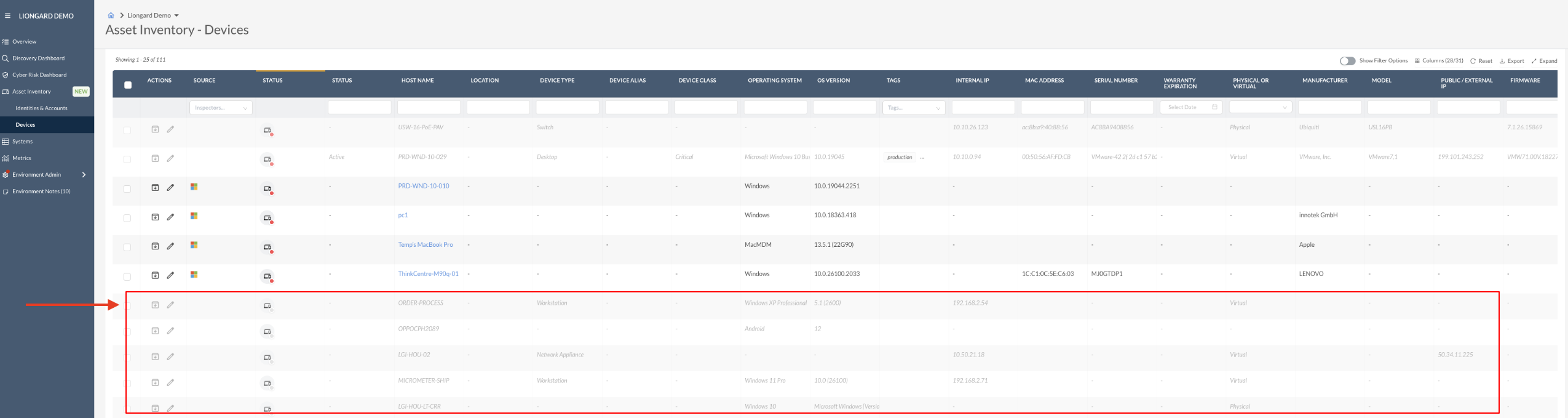
We are excited to introduce stale data identification within Asset Inventory to help you maintain accurate and up-to-date asset records.
This new feature identifies asset records that are considered stale, including:
- Assets that have not been observed within the last 45 days
- Assets associated with deleted inspectors
Stale assets are visually indicated within Asset Inventory (grayed out), making it easier for you to identify outdated entries and take appropriate action to keep your environment clean and accurate.
For more information about this new feature, please review our documentation.
Network Discovery Update: CIDR Range Enforcement
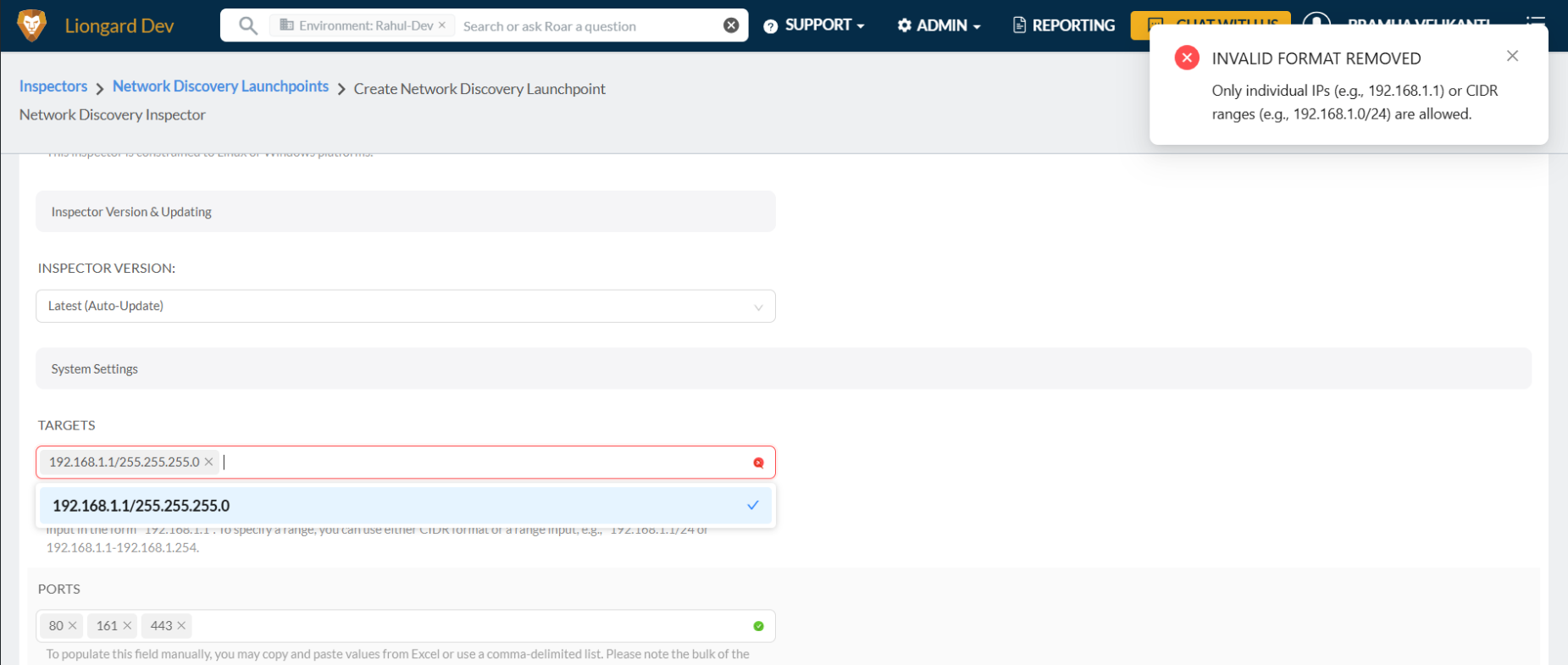
Network Discovery has been updated to enforce the use of CIDR notation for defining scan targets, improving consistency, accuracy, and alignment with modern networking standards.
What’s Changed
- The target input field now accepts valid CIDR ranges (for example,
10.0.0.0/24). - Individual IP addresses (for example,
10.0.0.5) are still supported. - Traditional IP range formats (such as
10.0.0.1-10.0.0.100) are no longer accepted.
Validation Improvements
- Input validation now clearly indicates when an entry is invalid.
- Users receive immediate feedback if an unsupported or incorrectly formatted value is entered.
Why This Matters
This change standardizes how network ranges are defined, reduces configuration errors, and ensures more reliable and predictable Network Discovery behavior across environments.
Minor Updates and Bug Fixes
Platform Minor Updates and Bug Fixes
- Fixed an issue with the export format when exporting the Cyber Risk Dashboard.
- Additional Default Metrics added to support the new Visual Insights Dashboards.
- Fixed an issue with the expand button not working on the Admin > Mappings page.
- Fixed an issue where hidden line breaks in data caused “contains” metrics to fail when matching values across multiple lines.
- Fixed an issue with filtering and sorting tables by date.
- Fixed an issue with the onboarding checklist disappearing after enabling.
- Fixed an issue with Environment Overview styling in dark mode.
- Updated Look and feel of Email DNS drill-down table in the Cyber Risk Dashboard.
- Fixed an issue with the Onboarding Checklist presenting a gray overlay preventing normal use.
- Fixed a bug that prevented the AI agent from properly responding if one or more environments did not have AI Usage enabled.
- Fixed the issue to prevent agents from returning non-useful intermediate thinking steps in the response.
- Improved table formatting for chat responses.
- Fixed the behavior of Recently Asked chat questions and state history.
- Improved the search bar 'X' icon to only display on hover over and now only clears the input field when used, not the search history (Recently Viewed) items.
- Added a tooltip to the feedback icons to encourage users to vote and provide comments.
- Resolved an issue where filter chips in the search bar were not being cleared in between logged-in sessions due to browser caching.
Integration and Inspector Minor Updates and Bug Fixes
- Active Directory
- Resolved an issue with the Active Directory inspector where certain data fields failed to return consistently, causing false positive alerting.
- Resolved an issue with the Active Directory inspector where the Users and RootDSE data fail to return and cause timeouts, preventing User data from populating.
- Resolved an issue with excessive 'Active Directory | Remote Desktop Groups Changes' alerts caused by intermittent timeouts on returning group data.
- Resolved an issue with the Active Directory inspector where it would intermittently fail to collect all computer accounts.
- Resolved an issue with the Active Directory inspector where User data was failing to display.
- Asset Inventory
- Resolved an issue with Asset Inventory where identical user emails were being multiplied by improving identity-matching logic.
- Autotask
- Resolved an issue with the Autotask integration where successfully mapping displayed a 'Go to Dashboard' button that did not function.
- ConnectWise
- Resolved an issue with the ConnectWise integration where inconsistent and delayed updates of ticket statuses from ConnectWise to Liongard caused mismatched alert counts.
- Renamed the ConnectWise RMM inspector to ConnectWise Asio inspector.
- Google Workspace
- Resolved an issue with the Google Workspace inspector where it failed to correctly return ChromeOS devices during inspection.
- Internet Domain/DNS
- Resolved an issue with the Internet Domain/DNS inspector where SPF recursion was not correctly marked as a failed check.
- Improved the Internet Domain/DNS inspector by removing TTL and WHOIS contact data from metrics to reduce false positive alerts.
- Resolved an issue in the Internet Domain/DNS inspector that generated false positive DNS A record change alerts, resulting in inconsistent DNS results.
- Resolved an issue with the Internet Domain/DNS inspector where the error “Unable to find any WHOIS information for domain.” would cause failures during inspector setup.
- Resolved an issue with the Internet Domain/DNS Inspector where it displayed incorrect expiration dates for .mobi domains.
- Resolved a setup issue with the Internet Domain/DNS inspector caused by a timeout when obtaining WHOIS data, despite the data being available.
- Resolved an issue with the Internet Domain/DNS inspector where inaccurate domains were discovered due to logic detecting phantom subdomains caused by redirections or custom 404 pages.
- IT Glue
- Resolved an issue with the IT Glue integration where organizations would not appear if mapped to an environment that does not exist.
- Microsoft 365
- Resolved an issue with the Microsoft 365 inspector with incomplete ingestion of Endpoint Security and policy settings.
- Resolved an issue with the alert “Microsoft 365 | Alert generated due to MFA count in Secure Scores” where it would trigger even though MFA was already enforced for users through a third-party MFA.
- PFSense
- Resolved an issue with the PFSense inspector where successful inspections were not showing data in System Details or in the Data Print Explorer.
- SonicWall
- Resolved an issue with the SonicWall inspector and Edit Rule page logic that caused inspections to report false successes, preventing alerts from being generated.
- Ubiquiti Unifi
- Resolved an issue with the Ubiquiti UniFi inspector where inspections were failing due to requiring administrator permissions. Inspections now complete successfully with read-only permissions, as expected.
Visual Insights Minor Updates and Bug Fixes
- Features
- Shared dashboards can now be organized into folders for easier navigation and cleaner dashboard lists.
- Added an Auto-Compact Widgets option to automatically tighten layouts as space becomes available.
- Drill-down headers now respect custom themes for a more consistent branded experience.
- Shared dashboards now preserve filters per browser, allowing independent exploration by multiple users.
- Widgets affected by global date filters now display a calendar icon with details on applied date limits.
- Improvements
- Added a clear warning when applying a quick filter to a widget, indicating that the change affects all users, so it feels safer and less surprising.
- Redesign the filter sidebar with clearer chips, an "All Filters" dialog, and improved date options to make managing filters easier and more discoverable.
- Refresh the integrations page with enhanced search, more robust statistics, and improved empty states so it’s faster to see what’s connected and what’s available.
- Bug Fixes
- Fix an issue where charts using weekly time increments could show dates shifted by a week, so time-based views now line up correctly with your data.
- Resolve a problem where Autotask tickets could stall during syncing, improving the reliability of ticket updates over time.
- Ensure you can always add new virtual columns, even when working with aggregated or modified datasets, preventing errors that block those edits.
- Fixed an issue where some Google Sheets spreadsheets did not appear in the selector, ensuring all eligible sheets are now available to choose from.
- Prevent template card descriptions from being cut off by adding a "Show more" option, allowing users to read longer explanations without disrupting the layout.
- Repair QuickBooks line item dataset syncing by correctly handling virtual primary keys so those datasets can refresh without errors.
- Improve the handling of failing data sources so that repeated calculation errors no longer clog processing and are tracked more safely.
- Handle missing or inaccessible avatar images more gracefully so users without an uploaded avatar no longer trigger system errors.
- Fix Excel file discovery for Office 365 so you can reliably browse and select spreadsheets stored in your Microsoft account.
- Improve Excel and cloud file handling so files from different drives and locations are discovered, deduplicated, and listed more consistently.
- Enhance the Google Sheets and Excel selector components to improve usability, making it easier to pick the correct file or sheet in everyday workflows.
- Reduce retries and improve the stability of long-running sync jobs so background processes fail less noisily and recover more predictably.
Updated 9 months ago