

Model Context Protocol (MCP) server
Model Context Protocol (MCP) Server Access
Liongard partners can enable direct, secure access to Liongard’s Model Context Protocol (MCP) server, providing standardized integrations, event-driven automation, and contextual asset management across their technology stack.
This capability supports unified access to asset intelligence and enables conversational, chat-driven interaction with managed environments for real-time insight and action.
Capabilities
With the MCP, you can:
-
Programmatically query managed assets Access all managed assets and their associated system context using your preferred agentic interface and models.
-
Support compliance and evidence gathering Retrieve structured data to streamline automation, compliance validation, risk analysis, incident response documentation, and audit preparation.
-
Leverage agentic chat-driven interaction Use Liongard’s chat-based interface to interact directly with their environment, generate asset summaries, and perform system- or environment-level assessments through natural language prompts.
-
Monitor inspector and agent health Retrieve operational data related to Inspector performance and Agent health to support reliability, monitoring, and operational oversight.
How It Works
MCP Powered Insights
Liongard’s MCP enables users to submit natural-language queries such as:
- "Show me all SonicWall firewall appliances, across every environment and list any licensed features. Include the customer name, firewall name, feature name, expiration date, and days remaining.” to prepare for QBRs and audits.
- “Of the systems Liongard is tracking, how many have had a successful inspection in the last 30 days?” to identify systemic issues and ensure Liongard remains healthy.
- "Have there been any updates to password policies in Active Directory for this customer?" to assess configuration drift for a system across a time period.
Users can ask follow-up questions to refine results or drill deeper into specific assets, systems, or conditions. This capability demonstrates Liongard’s AI-native architecture, where artificial intelligence is deeply integrated into the platform’s data model and asset intelligence layer.
Service desk and technical staff can retrieve actionable intelligence without scripting or manual API queries.
Available Tools
- Environments: customer/tenant scope, configuration, and setup details
- Systems & Launchpoints: inventory of monitored IT assets and services per environment, plus inspection workflow status, scheduling, and error diagnostics (Systems and Launchpoints are exposed by a single unified tool)
- Devices: hardware and OS attributes for reconciled devices — hostname, IP, serial number, operating system, EDR/antivirus, warranty, and more
- Identities: reconciled user and account attributes — MFA status, privileged accounts, account activity, department, and more
- Domains: DNS/web domain profiles — DMARC health, registrar, expiration, email/website detection, and more
- Agents: health, status, and platform details for the Liongard Agents running inspections
- Events: real-time system state changes and notable occurrences captured during inspection runs
- Timelines: inspection history and point-in-time snapshot records
- Detections: raw configuration changes and observed drift events
- Alerts: active notifications triggered by detections or thresholds
- Metrics: JMESPath-evaluated values from inspection data for compliance and posture tracking
- Reports: exportable operational summaries and risk overviews
- Cyber Risk Dashboard: scored security posture and control gap analysis by environment
- Navigate: a tool-discovery helper that MCP clients use to progressively list available Liongard tools and their schemas
- Query: natural language questions answered across environments, systems, and assets
MCP Server Access
MSP partners and alliance vendors can securely access Liongard data through the Model Context Protocol (MCP). Use MCP clients or dev tools such as:
- Claude (Chat, Cowork, Code)
- Cursor
- n8n
- VS Code
- OpenAI ChatKit
- Zed
- Microsoft Copilot Studio
Access is enabled by generating authentication tokens through the Admin console. These tokens allow authorized systems to programmatically query Liongard data using secure Bearer token authentication.
Credit Metering
MCP subscribers receive a substantial entitlement of AI Insight credits. Each credit equates to a successful response or completed session.
Credits refill monthly, and unused credits do not roll over.
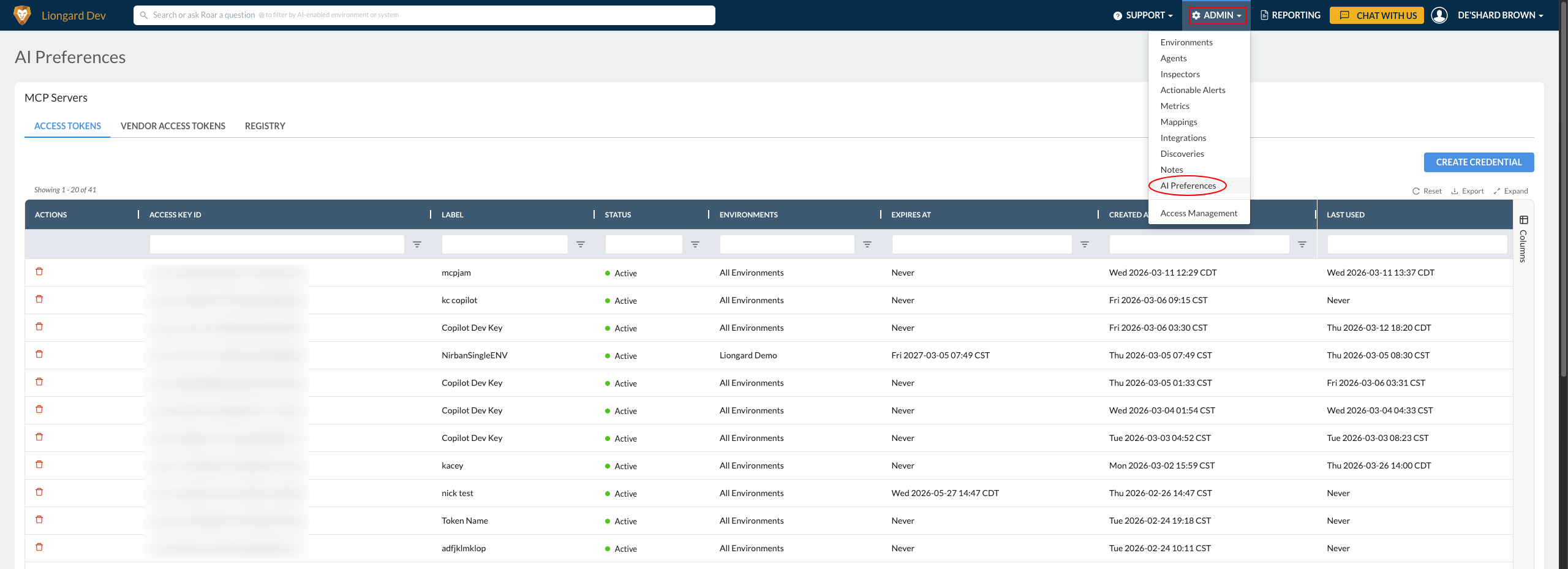
Admin AI Preferences Panel
MCP subscribers will receive access to the Admin AI Preferences Panel in Liongard (Admin > AI Preferences)
Pre-Requisites
- An active LiongardIQ and Liongard MCP subscription
- Provisioned access tokens generated through the Admin > AI Preferences panel
- AI search functionality requires explicit authorization per tenant.
- MCP access initially supports global service provider tenancy access. Please use with caution.
Updated about 1 month ago