

Release Notes Through 2026-3-12
Overview
2 New Pre-built Dashboards in Visual Insights
We have added two more pre-built dashboards within Visual Insights: Azure Identity, Devices, and Infrastructure Assessment Dashboard and SonicWall V7 Security Assessment Dashboard designed to provide deeper security visibility and faster assessments:
🔐 Azure Identity, Devices, and Infrastructure Assessment Dashboard
Gain comprehensive insights into Azure identity configurations, device posture, and infrastructure risk indicators — all in one consolidated view to support security reviews and executive reporting.
🛡️ SonicWall V7 Security Assessment Dashboard
Quickly assess firewall configurations, security settings, and exposure risks within SonicWall Gen 7 environments to drive proactive remediation conversations.
These dashboards are available now in the Template Gallery and can be applied to your environment immediately. Please refer to our documentation for more details.
Visual Insights Pro: Autotask, and HaloPSA
Visual Insights Pro now includes out-of-the-box integrations for Autotask, and HaloPSA, expanding its real-time dashboard capabilities. These new connectors make it easy to pull in diverse data sources and build polished, branded dashboards and reports for both internal teams and clients.
Autotask
The Autotask connector for Visual Insights Pro allows you to sync your Autotask PSA data into a powerful analytics and reporting environment.
Once connected, your data automatically syncs across more than 15 supported datasets, including Companies, Contacts, Configuration Items, Contracts, Contract Milestones, Contract Rates, Contract Service Bundles, Contract Services, Invoices, Products, Projects, Resources, Service Calls, Tasks, Tickets, and Time Entries. This continuous synchronization ensures you always have up-to-date information available for reporting and analysis.
For more information about this feature, please review our documentation.
HaloPSA
The HaloPSA integration syncs multiple types of data into the platform, including:
- Service desk data such as tickets, notes, teams, and SLA targets
- CRM data including clients, sites, and contact history
- Asset data like configuration items and asset fields
- Project data such as project status, milestones, and task completion
- Financial data including invoices and charge rates
For more information about this feature, please review our documentation.
Conversational Enriched Search
Our AI-enriched search is now conversational. Partners can interact with Liongard data using natural language, receiving environment, system, and asset-level insights, and following up with contextual queries directly within the platform.
Features:
- Query deeper into managed assets and retrieve contextual summaries (contracts, system health, security exposures).
- Evidence gathering for compliance, risk, and incident response.
- Interact with environment data via agentic chat for asset summaries and environment assessments.
For more details, please review our documentation.
Liongard App Activity Logging (Phase Release)
Liongard now introduces App Activity Logging, delivering enhanced visibility into key system and user actions across the platform. Designed to support IT operations, security teams, and compliance requirements, this phased release provides a detailed audit trail of significant in-app events.
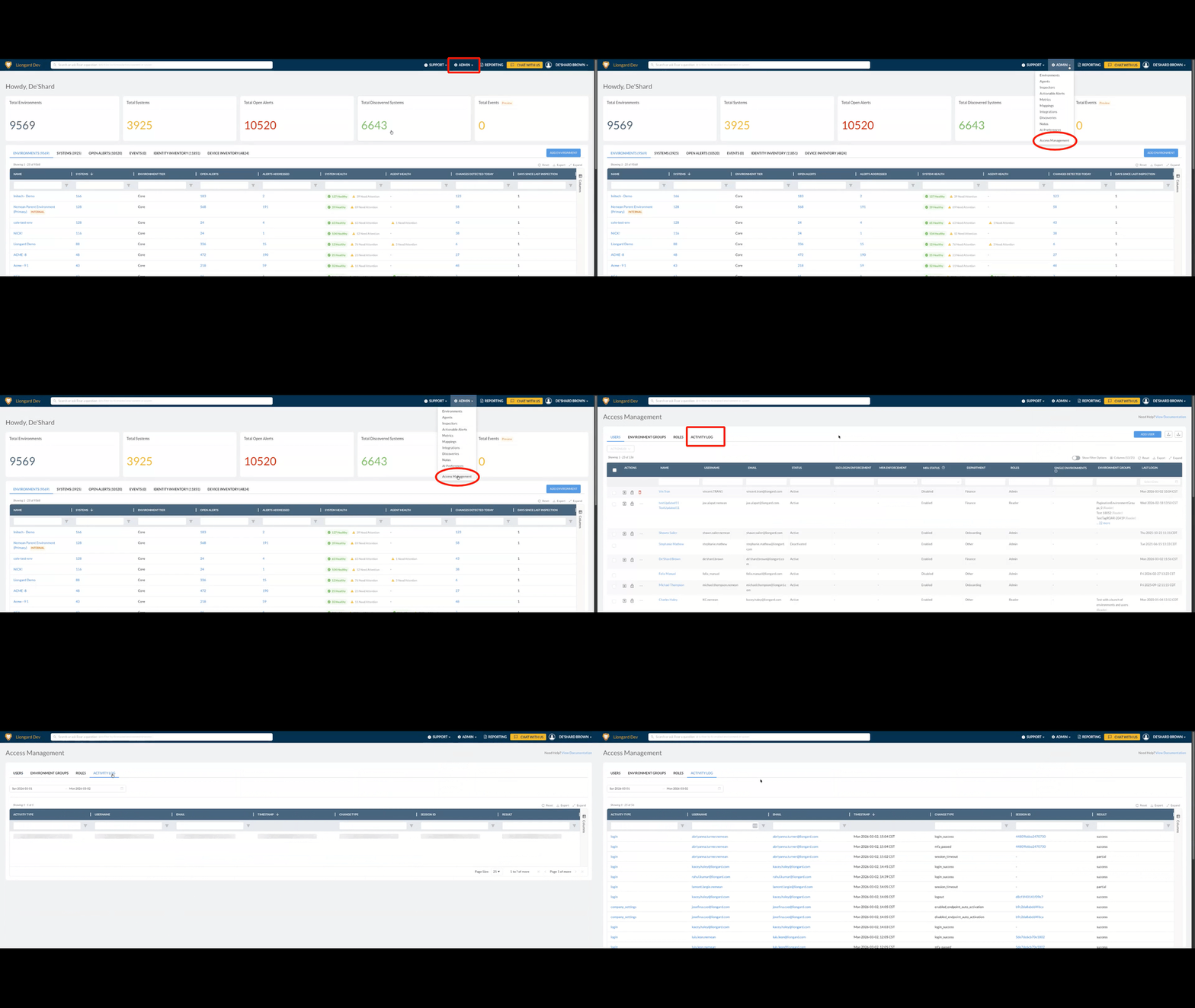
What’s New
Comprehensive Event Tracking: Capture detailed records of critical changes, including launchpoint updates, environment modifications, and agent activity.
Security & Compliance Support: Maintain a reliable audit trail of user actions and system events to help meet industry compliance and change management standards.
AI & User Management Visibility: Log AI-related operations and user management activities to ensure transparency and accountability across your organization.
To learn more about this feature, please review our documentation.
Axcient x360 Recover Inspector Update
Parent-Child Discovery Model Support
The Axcient x360 Recover Inspector has been updated to support Liongard’s parent-child entity discovery model. With this update, Axcient backup clients discovered during inspections are now automatically created as child entities.
What This Means
- Discovered Axcient backup clients are now created as child entities
- New systems are placed in the Discovered Systems tab for review
- You can choose to promote systems to Active Launchpoints or archive them if not needed
Minor Updates and Bug Fixes
Platform and Gen AI Minor Updates and Bug Fixes
- Fixed the issue where the AI agent responded with incorrect links for users who access multiple instances.
- Improve logic to properly count open alerts.
- Improved the AI agent responses to avoid returning inspector metadata and attempt to answer with the details from the inspection payload.
- Improved the AI agent's response to provide clarity on which environments require AI usage to be enabled before proceeding.
- Improved filter logic for system, inspector, and agent states for the AI agent to return accurate counts.
- Gen AI: Improve backend to support filtering within the prompt using filter tags.
- Improved formatting of historical prompts when using at tags.
- Fixed an issue where the previous prompt populated the prompt input when the user clicked New Conversation.
- The AI agent will now respond with confirmation and seek clarification for vague or incorrect spellings before attempting to query the system for data.
- Improved the AI agent user experience by introducing a confirmation step before executing searches and queries.
- Improved the wait time experience and better informed the user of the AI agent's actions while processing responses.
- Implemented the AI Preferences admin design to align with Liongard UI standards.
- Improved the AI agent response formatting.
- Resolved platform crashes experienced when clicking on Startup Configuration and Running Configuration for the Cisco IOS inspector, Cisco SBS inspector, and the PFSense inspector.
- Enhanced the Environment Overview page by adding System Health, Agent Health, and Days Since Last Inspection columns to the Environment table, providing quick insight into each environment’s status and health. Global Admins and Environment Admins can drill into these values for additional detail.
- Improved the search bar to display recently visited Environments, giving users quick links to their respective overview pages.
Integration and Inspector Minor Updates and Bug Fixes
- Actionable Alerts
- Improved Actionable Alerts to where "New", unsilenced stale computer alerts, are now refreshing with the data found on the latest scheduled or manual inspection.
- Asset Inventory
- Asset inventory now surfaces the License expiration date column.
- ConnectWise
- Improved the ConectWise integration by adding the ability for Liongard Windows Workstation inspector warranty data to sync with ConnectWise Manage configuration fields.
- Resolved an issue with the ConnectWise Asio inspector where the documentation link was not working as expected.
- Cisco Umbrella
- Resolved an issue with the Cisco Umbrella inspector where activated discovered child launch points would result in a setup issue or inspection failure error during inspection. Additionally, in the System Details Network tab, the Status column has been renamed to Session Status.
- Halo PSA
- Improved the HaloPSA integration by adding support for on-premise configurations, which can be enabled using the Deployment Type option on the integration setup page.
- IT Glue
- Improved the IT Glue integration by adding the ability for Liongard Windows Workstation inspector warranty data to sync with IT Glue configuration fields.
- Metrics
- Resolved an issue with the built-in metric “Windows Workstation: Defender – Exclusion Paths” where it was incorrectly mapped to exclusion processes instead of exclusion paths.
- Microsoft 365
- Resolved an issue in Microsoft 365 Inspector where sorting the Risky Users “Last Updated” (Descending) column did not display dates in the correct order.
- N-Able N-Central
- Resolved an issue with the N-able N-central inspector where updating the inspector's friendly name caused an error that prevented the configuration change from being saved.
- Resolved an issue with the N-Able N-Central inspector where inspections will timeout if there are no devices found.
- Roar Inspector
- Resolved an issue with empty "Agents" objects within the Environment dataprint array.
- ServiceNow
- Improved the ServiceNow integration by allowing users to select their desired available Assignment Groups as the Destination when configuring Alert Templates.
- SonicWall
- Resolved an issue in the SonicWall inspector where inspections run against an unsupported SonicOS version returned a generic error instead of a clear message describing the required SonicOS version for inspection.
- VMware ESXi
- Resolved an issue with the VMware ESXi inspector where it would remain stuck in a 'Running' state and ultimately fail to complete due to a timeout.
- Windows WorkStation / Server
- Resolved an issue with the Windows Workstation inspector where an intermittent DNS resolution error would cause inspection failures.
- Improved the Windows Workstation inspector System Details Overview to include a field for EDR Software found on inspection.
- Resolved an issue with the metric “Windows Server: ThreatLocker Installed?” where the returned response was showing 'false' despite the service being installed.
Visual Insights Minor Updates and Bug Fixes
- Features
- Added dashboard import/export support so teams can copy and paste dashboards across environments more quickly.
- Expanded Autotask support with additional synced datasets.
- Added a modified dataset option to convert number columns to absolute values for cleaner calculations.
- Improvements
- Added an option to hide gauge interval labels for cleaner, less cluttered widgets.
- Added control over which day starts the week in week-based date conversions.
- Added per-calculation formatting in Matrix widgets so mixed metrics can be displayed clearly in one view.
- Improved data lineage defaults so dashboards remain visible while widget visibility is easier to control.
- Strengthened ShareLink filter variable protections to better prevent unintended data exposure.
- Added market information to the ConnectWise companies dataset for richer account context.
- Overhauled global search for better speed, cleaner navigation, and more focused results.
- Improved email sending reliability and maintainability with the new delivery setup.
- Added customizable no-data messages so empty widgets can communicate intent more clearly.
- Improved threshold builder clarity with easier comparison selection.
- Added support for dynamic max values in gauge widgets using data layers.
- Bug Fixes
- Fixed template filter variable behavior so non-dynamic variables retain expected values when applied.
- Fixed Autotask time entry sync failures.
- Fixed widgets not refreshing correctly after global date filter changes.
- Fixed validation so text filter variables can no longer be applied to number-only filters.
- Fixed multi-layer bar charts so zero-value series render correctly.
- Fixed Autotask contacts sync validation issues that blocked data pulls.
- Fixed repeated retries for persistently failing datasets by stopping after repeated failed attempts.
- Fixed cases where dashboards could appear to refresh indefinitely.
- Fixed nested filter group logic that caused grouped filters to break.
- Fixed missing ConnectWise service team leader fields in synced datasets.
- Fixed QuickBooks On-Prem dataset option issues that blocked adding some new tables.
- Fixed modified dataset joins so they update correctly after datastream changes.
- Fixed site lockups when opening deeply nested dashboard folders.
- Fixed hourly chart axes to use widget timezone and standard time formatting.
- Fixed tier limit refresh behavior after downgrades so updated limits apply reliably.
Updated 7 months ago