

Lead Discovery Hunt (Scans)

Lead Discovery
Lead Discovery helps you build a pipeline of high-fit companies without relying on outdated lead lists or spending time on manual research. To get started, add a target company or domain that you already know, such as one of your best customers, and run a scan (called a Hunt).
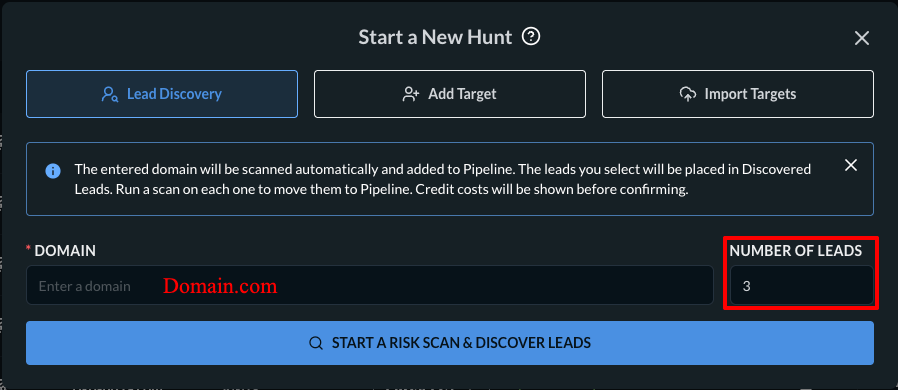
The Hunt identifies risk-scored peer and lookalike organizations that match similar characteristics, including industry, company size, and geographic market. These results are added to the Discovered Leads tab in your Workspace.
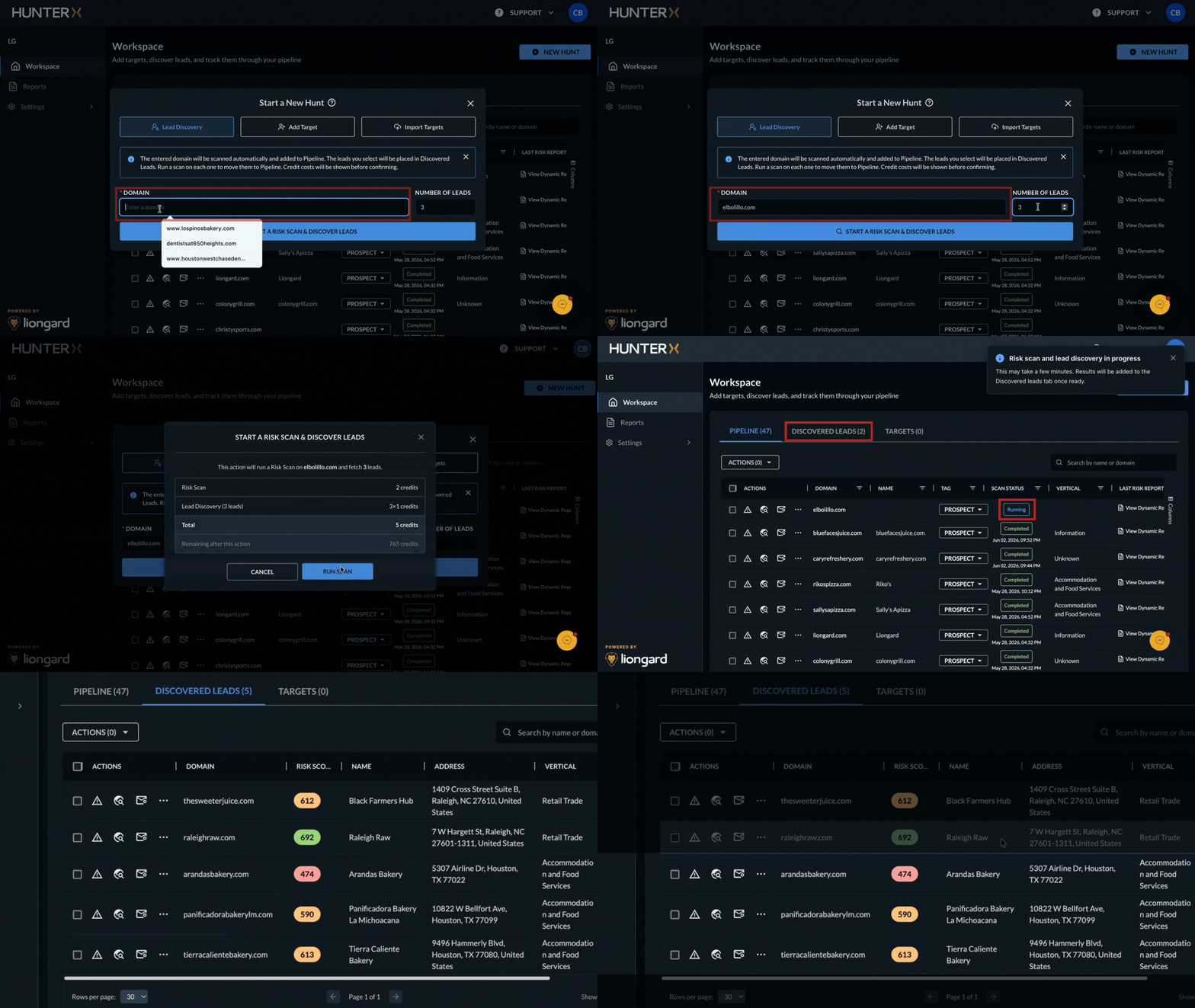
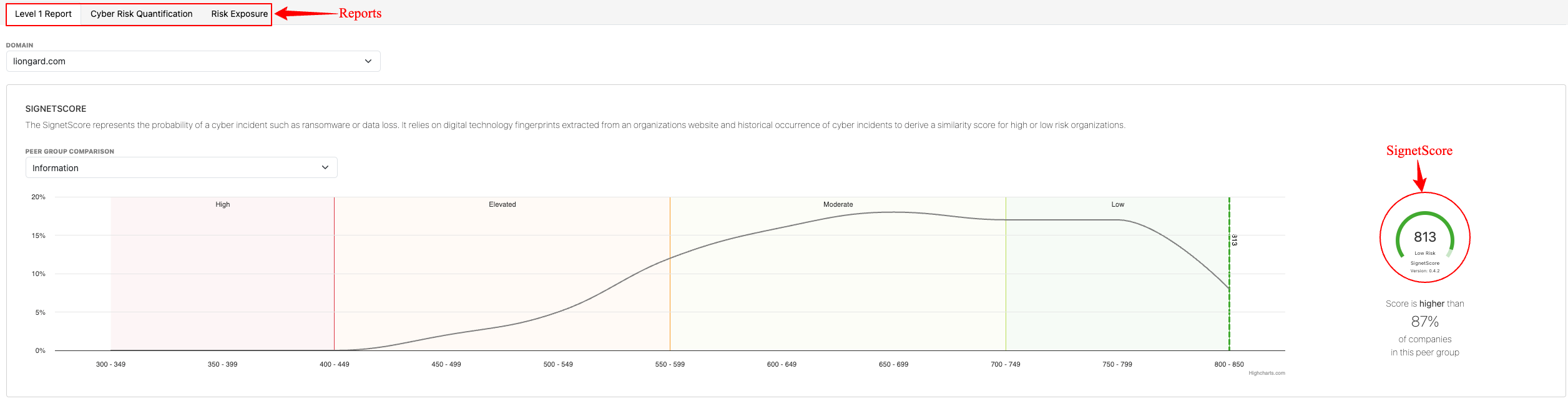
From there, you can review and qualify leads, promote them into your pipeline, and categorize them as prospects or clients. For each company, you can use the Enterprise Cyber Risk Report to support risk-based outreach. The report includes the SignetScore, Risk exposure insights, and Cyber Risk Quantification data, helping you identify opportunities and communicate potential business risks to prospective customers.
Feature Highlights
- Scan-Driven Discovery — Start by scanning a seed company; HunterX returns comparable peer and lookalike companies as discovered leads.
- Risk-Scored Leads — Each discovered lead arrives with a SignetScore risk score plus firmographics (vertical, employee count, revenue, and address).
- Agentic Peer Discovery — A SignetRisk-powered agentic framework matches peers by sector, size, and geographic market alignment.
- Pipeline Workspace — Track Targets, Discovered Leads, and Pipeline in one workspace, with scan status, dynamic & comprehensive reports, and outreach (email) status.
- Self-Serve, No Setup — Sign up with a business email at hunterx.liongard.com and start hunting. No agents, no install, no internal access required.
- Credit-Based & Flexible — Run scans using credits, with partner and non-partner provisioning paths.
To see it in action, please take this Lead Discovery tour.
Data Security & Privacy
Lead Discovery uses publicly available and partner-provided business data for company-level discovery and enrichment. No customer production data is processed, and scanning runs without agents or internal access.
Frequently Asked Questions
- How are leads discovered? - You start by scanning a seed company you already know (a target). HunterX returns risk-scored peer and lookalike companies into the Discovered Leads tab. Discovery is scan-driven — there is no separate list query.
- Where do Cyber Risk Quantification and External Risk Intelligence come from? - They are part of the Enterprise Cyber Risk Report (powered by SignetRisk) produced by each scan, including the SignetScore, peer/sector comparisons, technology-artifact exposure breakdown, and quantified financial loss exposure with recommended coverage limits.
- How fresh is the data? - Discovery and scanning use publicly available and partner-provided business data; results reflect the most current signals available at scan time.
- Does it deduplicate with existing accounts? - Domain and firmographic matching help prevent duplicate companies in your results.
- Why is a Risk Scan 2 credits and a Lead 1 credit? - A discovered Lead is a single qualified company record, so it costs 1 credit. A Risk Scan costs 2 credits because it performs deeper external exposure analysis (domains, email security, and public-facing infrastructure) and returns the full Enterprise Cyber Risk Report.
- Why does a scan require at least 5 credits? - A Hunt runs the agentic peer-discovery engine across many candidate companies and returns a batch of risk-scored leads, so it has a hard minimum of 5 credits — it cannot be run for fewer.
- What credits do new accounts get? - New/non-partner signups and partner trials are granted a 10-credit SKU with a 30-day default expiry.
Complete security assessment, including technical and dark web analysis.
- All Domain Checks
- Dark Web Email Scan (Search the dark web for leaked credentials)
- Credential Leaks
- Data Breaches
- Paste Sites
- DNS Security
- SSL Certificate
- Security Headers
- Open Ports
Here is a more comprehensive list of what the Comprehensive scans will return:
| Certificate mismatches | Exposed IoT Devices such as unsecured IP cameras, DVRs, and printers | Malware-related infrastructure | SSL/TLS Issues |
| CVE-exposed services (via version banners) | Exposed Smart home & industrial IoT devices | Misconfigured Services | VPN/Firewall/Proxy Misconfigurations |
| Debug or admin interfaces on public IPs | Firewalls exposing admin interfaces | No authentication required | Weak or deprecated protocols (SSLv3, TLS 1.0) |
| Expired/self-signed certs | ICS/SCADA systems (Modbus, BACnet) | Open VPN endpoints | Weak or Missing Credentials |
| Exposed dashboards (Jenkins, Kibana, Grafana) | Leaky proxies | OS fingerprinting (e.g., outdated Windows) | |
| Exposed High-Risk Ports | Leaked internal info in banners | Outdated software versions |
Risk Scans
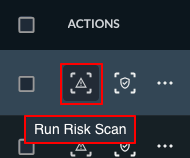
Risk scans: Analyze a company’s public-facing information to assess its exposure to cyber risk. It maps each company’s unique digital fingerprint against a comprehensive database, identifies shared characteristics with organizations that have or have not experienced cyber incidents, and then extrapolates the likelihood of a future event.
Risk Scan segments:
- Level 1 Report: This report gives an MSP insight into a prospect's likelihood of experiencing a cyber attack and quantifies the true cost of withstanding and recovering from such an event. It also provides useful supporting data to enrich initial conversations and keep the focus on business outcomes.
- Cyber Risk Quantification: This is an easily understandable numeric value that reflects the likelihood that a company will experience a cybercrime-related incident. It is built on the same scale as the traditional FICO score, so prospects can see at a glance where they stand in relation to risk.
- Risk Exposure: This is the result of the difference between total risk exposure and transferred risk (i.e., insurance). As companies evaluate their risk profile, they have three options to manage this exposure: increase insurance coverage, which means higher premiums; work with an MSP to reduce risk by implementing stronger security controls; or accept the current level of risk and the potential financial losses.
Scan CreditsEach Comprehensive scan will consume 1 scan credit credit. Each Risk Scan will consume 2 scan credits credits. Generating reports from the completed scans does not consume credits.
Credit Refund We will issue a refund for credit(s) when a Comprehensive scan is completed and no known vulnerabilities are found, or no findings from the email scan (clean. email). Or if an invalid domain was used
Updated 5 months ago