

Release Notes Through 2026-5-14
Overview
New Inspector: BitLyft (Beta)
We’re excited to introduce the BitLyft Inspector, which brings BitLyft Air security operations data directly into Liongard for centralized visibility across all your managed environments.
This inspector ingests key BitLyft AIR data—including tenants, users, roles, connector health, security cases, SIEM metrics, alerts, SOAR activity, and contract details—providing MSPs with a comprehensive, auditable view of their clients’ security posture without requiring direct access to the BitLyft console.
Highlights
-
Multi-Tenant Auto-Discovery Automatically discovers all accessible BitLyft tenants and creates child inspectors for scalable, hands-off management.
-
Security Operations Visibility Monitor SIEM metrics, security cases, alerts, and SOAR activity in one unified view.
-
Connector Health Monitoring Track integration health (healthy, degraded, unhealthy) to proactively identify data gaps.
-
User & Role Auditing Gain visibility into user access, roles, permissions, and account activity for improved security hygiene.
-
SOAR & Automation Insights View playbooks, actions, execution history, and rule status across IT and security operations.
-
Contract & Onboarding Visibility Track contract details, billing contacts, and onboarding status across tenants.
For more details about this new inspector, please review our documentation.
Feature Enhancement: Expanded NinjaOne Endpoint Telemetry
You now have deeper visibility into your managed endpoints with expanded telemetry from the NinjaOne Inspector. This update brings more comprehensive device insights directly into Liongard, helping you monitor, assess, and report on endpoint health without leaving the platform.
What’s New
- Installed Software Inventory: View a complete list of software installed on each endpoint
- Patch Compliance: Track both operating system and third-party patch status
- Windows Services Visibility: Monitor service inventory across devices
- Enhanced System Details: Access detailed hardware and system data, including BIOS, serial number, model, CPU, and memory
- Device Activity Signals: See key activity indicators such as last seen online, last logged-in user, and last restart
Why It Matters
With this expanded coverage, you can generate richer alerts, improve change detection, and build more meaningful reports—all without needing to pivot into NinjaOne for routine endpoint checks.
New Metrics Added to Liongard
We’ve expanded Liongard’s data coverage by introducing new metrics across key systems and integrations. With these additions, we’re giving you deeper visibility into your environments so you can better monitor performance, detect changes, and generate more meaningful insights.
Release at a glance
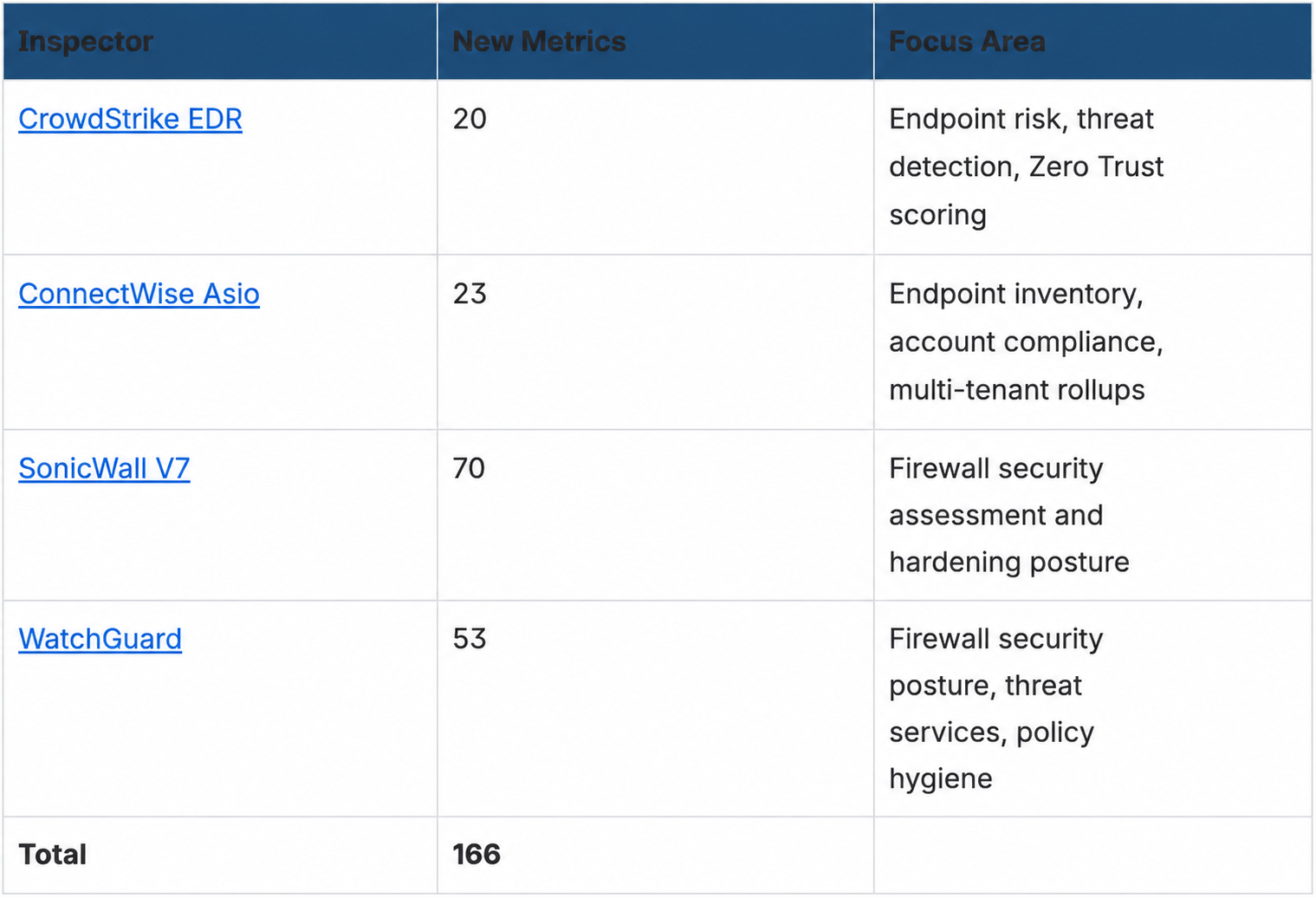
Click this link to view the list of our new metrics.
Dell Warranty Information
Dell warranty information now correctly appears in Windows Server and Workstation inspection results, restoring accurate warranty data for Dell devices.
Minor Updates and Bug Fixes
Platform and Gen AI Minor Updates and Bug Fixes
- Fixed a display issue where action buttons overlapped navigation tabs on the Environment Dashboard when viewed on smaller screens or at reduced browser window sizes.
- Fixed an issue where opening a scheduled report for a soft-deleted environment resulted in a 403 error.
- Fixed an issue where the Admin Metrics page would display an error and fail to load.
- Improved the support chat experience so that users are automatically associated with their company when initiating a conversation via the 'Chat with us' button, enabling faster and more contextual support.
- Fixed an issue where deleting an environment did not stop scheduled inspections from running or generating alerts.
- Fixed an issue where recently deleted environments were still counted on the Global Dashboard, causing an inaccurate total. The dashboard now reflects only active environments.
- When an environment is deleted, Liongard now records the action in the Activity Log and provides a 14-day window to restore it. Both deletions and restorations are logged with timestamps and are visible under Access Management > Activity Log.
- Pinned notes for inspectors are now visible directly on the global Inspectors page under Admin > Inspectors, so you can review important notes at a glance without navigating into individual system inspections.
- Fixed an issue where enabling AI Usage for a new environment did not persist after saving and returning to the main environment table view.
- Improved the Roar Assistant response for general questions for environments.
- Added the capability for Liongard admin to configure the Pay-as-you-go option with limited presets or unlimited AI Insight credit overage.
- Added edit, prompt copy, and paste functionality to Roar Assistant, including support for @-tagging.
- Added the ability for users to edit and resend the most recent prompt in a Roar Assistant thread.
- Added delete functionality to Roar Assistant history pane.
- MCP now filters systems by inspector type, not just name.
- Enhancement to MCP response to return TOON-formatted data.
- Enhanced the Activity Log to display report events and their associated change types, including Created, Updated, Deleted, Scheduled, Exported, and Sent.
- Enhanced the Activity Log to display note events and their associated change types, including Created, Updated, Deleted, and Reverted.
Integration and Inspector Minor Updates and Bug Fixes
- Acronis Cyber Cloud
- Resolved an issue with the Acronis Cyber Cloud inspector where parent inspector discovery returned a high number of child inspectors that did not match the actual number of partner tenants.
- Actionable Alerts
- Enhanced ticket reopen behavior to include evaluated metric values in the Roarbot comment when an alert condition is met, consistent with the unsilence ticket flow.
- Resolved an issue with Actionable Alerts where change detection alerts incorrectly reopened as "Not Remediated" instead of creating a new alert.
- Active Directory
- Resolved an issue with the Active Directory inspector where false positive alerts were triggered for Default Domain Policy password metrics (Complexity, Expiration, Length) even after the GPO had been updated.
- Addigy
- Enhanced the Addigy inspector to use the v2 API for improved reliability and access to newer data.
- Asset Inventory
- Fixed an issue in Asset Inventory where related assets continued to reference an identity after all underlying accounts were deleted. Deleted assets now display with a distinct visual indicator.
- Fixed an issue in Asset Inventory where records remained selected after a bulk state update moved them to a different table. Selections now clear correctly.
- Internet domains are now visible in Asset Inventory with key details for each domain.
- Fixed an issue in Asset Inventory where the 'Updated On' column in the Domains & Certificates view could not be sorted. Column sorting now works as expected.
- You can now delete individual identities and devices directly from Asset Inventory using the delete action on any asset record.
- Axcient x360
- Resolved an issue where Axcient x360Recover child inspectors could display devices belonging to other clients.
- BitLyft
- Improved the BitLyft inspector to always connect to the BitLyft SOAR production endpoint, removing the configurable Base URL field that was no longer needed.
- ConnectWise
- Enhanced the ConnectWise Asio inspector with an initial metric library covering offline devices, policy assignment gaps, patch compliance, software inventory, and stale endpoints.
- Resolved an issue with the ConnectWise Asio inspector where device findings were not appearing in Asset Inventory, even though the inspector completed successfully.
- CrowdStrike
- Enhanced the CrowdStrike EDR inspector with an initial metric library covering active detections, zero trust score thresholds, endpoint policy assignment, stale hosts, and detection severity rollups.
- Fortinet Fortigate
- Resolved an issue where the Fortinet FortiGate inspector could encounter a 429 rate limit error after repeated non-allowlisted runs locked out the API user.
- IT Glue
- Resolved an issue where the IT Glue Flexible Asset inspector could return a false "permission to update flexible asset type" error even when the partner's IP was correctly allowlisted.
- Microsoft 365
- Resolved an issue with the Microsoft 365 inspector where the Last Sign-In time always displayed as 00:00:00 instead of the full timestamp.
- Resolved an issue with the Microsoft 365 inspector where device Object IDs displayed in the dataprint did not match the values returned by the Microsoft Graph API.
- Network Discovery
- Security enhancement improvement in network discovery audit logs - when SNMPv3 credentials are configured within the inspector, they are masked as MASKED in the audit logs to eliminate exposure.
- NinjaOne
- Enhanced the NinjaOne inspector to include volume data such as capacity, free space, and BitLocker status, and to display timestamp fields in a readable date and time format.
- Windows WorkStation / Server
- Resolved an issue with the Windows Server and Windows Workstation inspectors where certain installed updates were missing from the dataprint due to a sorting issue.
Visual Insights Minor Updates and Bug Fixes
- Features
- Expanded import and export dashboard access for approved Liongard users with @liongard.com accounts.
- Date-based charts now adjust time granularity automatically, making longer time ranges easier to read without manual tuning.
- Aggregate steps now let you reorder grouping columns more easily, giving you better control over how results are organized.
- Modified datasets can now replace null values across mixed column types in a single step.
- Explode Date Span now supports weekdays-only or business-days-only expansion for workflows that should exclude weekends.
- Improvements
- Widgets now support higher-cardinality X-axis fields, making it easier to chart larger and more detailed result sets.
- Bug Fixes
- Notifications now take you directly to the item they reference.
- Multi-series chart tooltips now show the correct series names.
- Pie chart drill-down continues working after the first click.
- “Is Not Blank” filters now handle empty text values more reliably.
- Number widgets now refresh to the latest value without needing a resize.
- Widget editor previews now stay in sync with your latest changes more reliably.
- The Add Integration dialog is now more responsive.
- “Go to dataset” from a widget now opens in place instead of kicking you back through the dashboard.
- Full syncs no longer risk leaving datasets inactive when a sync returns no rows.
- Template filter variable mappings now apply more reliably when copying or applying templates.
Updated 5 months ago